Ollama
Download and run Ollama models locally and expose them via a public API
Ollama is an open-source tool that lets you run LLMs directly on your local machine. Combined with Clarifai's Local Runners, you can serve Ollama models from your machine, expose them via a public API, and access them through the Clarifai platform — all while keeping the speed, privacy, and control of local inference.
Step 1: Install Prerequisites
Install Ollama
Go to the Ollama website and install the appropriate version for your system (macOS, Windows, or Linux).
Note: On Windows, restart your machine after installing to ensure environment variables are applied.
Install Clarifai
- Bash
pip install --upgrade clarifai
Note: Python 3.11 or 3.12 is required. The
openaipackage is included withclarifai.
Step 2: Log In
- CLI
clarifai login
You'll be prompted for your user ID and PAT. This saves your credentials locally so you don't need to set environment variables manually.
Step 3: Initialize a Model
Scaffold a model project using any model from the Ollama library:
- CLI
clarifai model init --toolkit ollama --model-name gpt-oss:20b
Example Output
clarifai model init --toolkit ollama --model-name gpt-oss:20b
[INFO] Initializing model with ollama toolkit...

  Model initialized in "./gpt-oss:20b"

  Test locally:
    clarifai model serve "./gpt-oss:20b"
    clarifai model serve "./gpt-oss:20b" --mode env       # auto-create venv and install deps
    clarifai model serve "./gpt-oss:20b" --mode container # run inside Docker

  Deploy to Clarifai:
    clarifai model deploy "./gpt-oss:20b" --instance a10g
    clarifai list-instances                               # list available instances
This creates a ./gpt-oss:20b/ directory with three files:
gpt-oss:20b/
├── 1/
│   └── model.py       # Ollama inference logic
├── requirements.txt   # Python dependencies
└── config.yaml        # Model config (user_id/app_id auto-filled from login)
Omitting --model-name will install the default model (llama3.2):
clarifai model init --toolkit ollama
Use ollama list to see downloaded models and ollama rm to remove one.
Note: Some models are very large and may require significant memory or GPU resources. Check your machine's capacity before initializing.
model.py
import json
import os
import subprocess
import time
from typing import Iterator, List

from openai import OpenAI

from clarifai.runners.models.openai_class import OpenAIModelClass
from clarifai.runners.utils.data_types import Image
from clarifai.runners.utils.data_utils import Param
from clarifai.runners.utils.model_utils import execute_shell_command
from clarifai.runners.utils.openai_convertor import build_openai_messages
from clarifai.utils.logging import logger

if not os.environ.get('OLLAMA_HOST'):
    PORT = '23333'
    os.environ["OLLAMA_HOST"] = f'127.0.0.1:{PORT}'
OLLAMA_HOST = os.environ.get('OLLAMA_HOST')

if not os.environ.get('OLLAMA_CONTEXT_LENGTH'):
    os.environ["OLLAMA_CONTEXT_LENGTH"] = '8192'


def run_ollama_server(model_name: str = 'llama3.2'):
    """Start Ollama server and pull the model."""
    try:
        # Start server in the background
        execute_shell_command(
            "ollama serve",
            stdout=subprocess.DEVNULL,
            stderr=subprocess.DEVNULL,
        )
        # Wait for server to be ready
        start = time.time()
        while time.time() - start < 30:
            try:
                r = subprocess.run(["ollama", "list"], capture_output=True, timeout=5, check=False)
                if r.returncode == 0:
                    break
            except (subprocess.TimeoutExpired, FileNotFoundError):
                pass
            time.sleep(1)
        else:
            raise RuntimeError("Ollama server did not start within 30s")

        # Pull model (blocking — must finish before we accept requests)
        logger.info(f"Pulling ollama model '{model_name}'...")
        result = subprocess.run(
            ["ollama", "pull", model_name], capture_output=True, text=True, check=False
        )
        if result.returncode != 0:
            raise RuntimeError(f"ollama pull failed: {result.stderr}")
        logger.info(f"Model '{model_name}' ready.")
    except Exception as e:
        raise RuntimeError(f"Failed to start Ollama server: {e}")


def has_image_content(image: Image) -> bool:
    return bool(getattr(image, 'url', None) or getattr(image, 'bytes', None))


class OllamaModel(OpenAIModelClass):
    client = True
    model = True

    def load_model(self):
        self.model = os.environ.get("OLLAMA_MODEL_NAME", 'llama3.1')
        run_ollama_server(model_name=self.model)
        self.client = OpenAI(api_key="notset", base_url=f"http://{OLLAMA_HOST}/v1")

    @OpenAIModelClass.method
    def predict(
        self,
        prompt: str = "",
        image: Image = None,
        images: List[Image] = None,
        chat_history: List[dict] = None,
        tools: List[dict] = None,
        tool_choice: str = None,
        max_tokens: int = Param(
            default=2048,
            description="The maximum number of tokens to generate.",
        ),
        temperature: float = Param(
            default=0.7,
            description="Sampling temperature (higher = more random).",
        ),
        top_p: float = Param(
            default=0.95,
            description="Nucleus sampling threshold.",
        ),
    ) -> str:
        """Return a single completion."""
        if tools is not None and tool_choice is None:
            tool_choice = "auto"

        img_content = image if has_image_content(image) else None
        messages = build_openai_messages(
            prompt=prompt, image=img_content, images=images, messages=chat_history
        )
        response = self.client.chat.completions.create(
            model=self.model,
            messages=messages,
            tools=tools,
            tool_choice=tool_choice,
            max_completion_tokens=max_tokens,
            temperature=temperature,
            top_p=top_p,
        )

        if response.usage is not None:
            self.set_output_context(
                prompt_tokens=response.usage.prompt_tokens,
                completion_tokens=response.usage.completion_tokens,
            )

        if response.choices[0] and response.choices[0].message.tool_calls:
            tool_calls = response.choices[0].message.tool_calls
            return json.dumps([tc.to_dict() for tc in tool_calls], indent=2)
        return response.choices[0].message.content

    @OpenAIModelClass.method
    def generate(
        self,
        prompt: str = "",
        image: Image = None,
        images: List[Image] = None,
        chat_history: List[dict] = None,
        tools: List[dict] = None,
        tool_choice: str = None,
        max_tokens: int = Param(
            default=2048,
            description="The maximum number of tokens to generate.",
        ),
        temperature: float = Param(
            default=0.7,
            description="Sampling temperature (higher = more random).",
        ),
        top_p: float = Param(
            default=0.95,
            description="Nucleus sampling threshold.",
        ),
    ) -> Iterator[str]:
        """Stream a completion response."""
        if tools is not None and tool_choice is None:
            tool_choice = "auto"

        img_content = image if has_image_content(image) else None
        messages = build_openai_messages(
            prompt=prompt, image=img_content, images=images, messages=chat_history
        )
        for chunk in self.client.chat.completions.create(
            model=self.model,
            messages=messages,
            tools=tools,
            tool_choice=tool_choice,
            max_completion_tokens=max_tokens,
            temperature=temperature,
            top_p=top_p,
            stream=True,
            stream_options={"include_usage": True},
        ):
            if chunk.usage is not None:
                if chunk.usage.prompt_tokens or chunk.usage.completion_tokens:
                    self.set_output_context(
                        prompt_tokens=chunk.usage.prompt_tokens,
                        completion_tokens=chunk.usage.completion_tokens,
                    )
            if chunk.choices:
                if chunk.choices[0].delta.tool_calls:
                    tool_calls_json = [tc.to_dict() for tc in chunk.choices[0].delta.tool_calls]
                    yield json.dumps(tool_calls_json, indent=2)
                else:
                    text = chunk.choices[0].delta.content if chunk.choices[0].delta.content else ''
                    yield text
requirements.txt
clarifai
openai
config.yaml
model:
  id: llama32
build_info:
  python_version: '3.12'
  image: ollama/ollama:latest
toolkit:
  provider: ollama
  model: llama3.2
Step 4: Serve Locally
Start the model as a local runner:
- CLI
clarifai model serve "./gpt-oss:20b"
Note: The first run pulls the model weights from Ollama, which may take a few minutes. Add
-vfor verbose logs.
Example Output
clarifai model local-runner
[INFO] 16:01:28.904230 > Checking local runner requirements... |  thread=8800297152
[INFO] 16:01:28.928129 Checking 2 dependencies... |  thread=8800297152
[INFO] 16:01:28.928672 ✅ All 2 dependencies are installed! |  thread=8800297152
[INFO] 16:01:28.928886 Verifying Ollama installation... |  thread=8800297152
[INFO] 16:01:29.004234 > Verifying local runner setup... |  thread=8800297152
[INFO] 16:01:29.004427 Current context: default |  thread=8800297152
[INFO] 16:01:29.004463 Current user_id: alfrick |  thread=8800297152
[INFO] 16:01:29.004490 Current PAT: d6570**** |  thread=8800297152
[INFO] 16:01:29.005945 Current compute_cluster_id: local-runner-compute-cluster |  thread=8800297152
[WARNING] 16:01:35.936440 Failed to get compute cluster with ID 'local-runner-compute-cluster':
code: CONN_DOES_NOT_EXIST
description: "Resource does not exist"
details: "ComputeCluster with ID \'local-runner-compute-cluster\' not found. Check your request fields."
req_id: "sdk-python-11.8.2-75ca9226003a4b34a770885b119d5814"
 |  thread=8800297152
Compute cluster not found. Do you want to create a new compute cluster alfrick/local-runner-compute-cluster? (y/n): y
[INFO] 16:01:58.382096 Compute Cluster with ID 'local-runner-compute-cluster' is created:
code: SUCCESS
description: "Ok"
req_id: "sdk-python-11.8.2-a0474b8ba93c4e069804500a188694db"
 |  thread=8800297152
[INFO] 16:01:58.391571 Current nodepool_id: local-runner-nodepool |  thread=8800297152
[WARNING] 16:02:00.633687 Failed to get nodepool with ID 'local-runner-nodepool':
code: CONN_DOES_NOT_EXIST
description: "Resource does not exist"
details: "Nodepool not found. Check your request fields."
req_id: "sdk-python-11.8.2-62149d46e7104d35bcb2a36546710329"
 |  thread=8800297152
Nodepool not found. Do you want to create a new nodepool alfrick/local-runner-compute-cluster/local-runner-nodepool? (y/n): y
[INFO] 16:02:03.909005 Nodepool with ID 'local-runner-nodepool' is created:
code: SUCCESS
description: "Ok"
req_id: "sdk-python-11.8.2-05836a431940495b94b9c3691f6c6d4d"
 |  thread=8800297152
[INFO] 16:02:03.921694 Current app_id: local-runner-app |  thread=8800297152
[INFO] 16:02:04.203774 Current model_id: local-runner-model |  thread=8800297152
[WARNING] 16:02:10.933734 Attempting to patch latest version: 9d38bb9398944de4bdef699835f17ec9 |  thread=8800297152
[INFO] 16:02:14.195999 Successfully patched version 9d38bb9398944de4bdef699835f17ec9 |  thread=8800297152
[INFO] 16:02:14.197924 Current model version 9d38bb9398944de4bdef699835f17ec9 |  thread=8800297152
[WARNING] 16:02:18.679567 Failed to get runner with ID 'f3c46913186449ba99dedd38123d47a3':
code: CONN_DOES_NOT_EXIST
description: "Resource does not exist"
details: "Runner not found. Check your request fields."
req_id: "sdk-python-11.8.2-0b3b241c76ef429290c8c54a318f2f21"
 |  thread=8800297152
[INFO] 16:02:18.679913 Creating the local runner tying this 'alfrick/local-runner-app/models/local-runner-model' model (version: 9d38bb9398944de4bdef699835f17ec9) to the 'alfrick/local-runner-compute-cluster/local-runner-nodepool' nodepool. |  thread=8800297152
[INFO] 16:02:19.757117 Runner with ID '2f84d7194ee8464fad485fd058663fe5' is created:
code: SUCCESS
description: "Ok"
req_id: "sdk-python-11.8.2-8ac525dc13ec47629213f0283e89c6a7"
 |  thread=8800297152
[INFO] 16:02:19.765198 Current runner_id: 2f84d7194ee8464fad485fd058663fe5 |  thread=8800297152
[WARNING] 16:02:20.331980 Failed to get deployment with ID local-runner-deployment:
code: CONN_DOES_NOT_EXIST
description: "Resource does not exist"
details: "Deployment with ID \'local-runner-deployment\' not found. Check your request fields."
req_id: "sdk-python-11.8.2-864f55e6bc554614894ee031cc30cdb9"
 |  thread=8800297152
Deployment not found. Do you want to create a new deployment alfrick/local-runner-compute-cluster/local-runner-nodepool/local-runner-deployment? (y/n): y
[INFO] 16:02:25.016935 Deployment with ID 'local-runner-deployment' is created:
code: SUCCESS
description: "Ok"
req_id: "sdk-python-11.8.2-b6bf9aad5aa545f8a041113608fc9365"
 |  thread=8800297152
[INFO] 16:02:25.024579 Current deployment_id: local-runner-deployment |  thread=8800297152
[INFO] 16:02:25.027108 Current model section of config.yaml: {'app_id': 'local-dev-runner-app', 'id': 'local-dev-model', 'model_type_id': 'text-to-text', 'user_id': 'clarifai-user-id'} |  thread=8800297152
Do you want to backup config.yaml to config.yaml.bk then update the config.yaml with the new model information? (y/n): y
[INFO] 16:02:27.407724 Checking 2 dependencies... |  thread=8800297152
[INFO] 16:02:27.408555 ✅ All 2 dependencies are installed! |  thread=8800297152
[INFO] 16:02:27.451117 Customizing Ollama model with provided parameters... |  thread=8800297152
[INFO] 16:02:27.451785 ✅ Starting local runner... |  thread=8800297152
[INFO] 16:02:27.451852 No secrets path configured, running without secrets |  thread=8800297152
[INFO] 16:02:30.020253 Detected OpenAI chat completions for Clarifai model streaming - validating stream_options... |  thread=8800297152
[INFO] 16:02:30.027464 Starting Ollama server in the host: 127.0.0.1:23333 |  thread=8800297152
[INFO] 16:02:30.040882 Model llama3.2 pulled successfully. |  thread=8800297152
[INFO] 16:02:30.041191 Ollama server started successfully on 127.0.0.1:23333 |  thread=8800297152
[INFO] 16:02:30.096053 Ollama model loaded successfully: llama3.2 |  thread=8800297152
[INFO] 16:02:30.096133 ModelServer initialized successfully |  thread=8800297152
Exception in thread Thread-1 (serve_health):
Traceback (most recent call last):
  File "/opt/homebrew/Cellar/python@3.12/3.12.11/Frameworks/Python.framework/Versions/3.12/lib/python3.12/threading.py", line 1075, in _bootstrap_inner
[INFO] 16:02:30.100802 ✅ Your model is running locally and is ready for requests from the API...
 |  thread=8800297152
[INFO] 16:02:30.100873 > Code Snippet: To call your model via the API, use this code snippet:

import os

from openai import OpenAI

client = OpenAI(
    base_url="https://api.clarifai.com/v2/ext/openai/v1",
    api_key=os.environ['CLARIFAI_PAT'],
)

response = client.chat.completions.create(
    model="https://clarifai.com/alfrick/local-runner-app/models/local-runner-model",
    messages=[
        {"role": "system", "content": "Talk like a pirate."},
        {
            "role": "user",
            "content": "How do I check if a Python object is an instance of a class?",
        },
    ],
    temperature=1.0,
    stream=False,  # stream=True also works, just iterator over the response
)
print(response)
 |  thread=8800297152
[INFO] 16:02:30.100944 > Playground:   To chat with your model, visit: https://clarifai.com/playground?model=local-runner-model__9d38bb9398944de4bdef699835f17ec9&user_id=alfrick&app_id=local-runner-app
 |  thread=8800297152
    self.run()
[INFO] 16:02:30.101006 > API URL:      To call your model via the API, use this model URL: https://clarifai.com/alfrick/local-runner-app/models/local-runner-model
 |  thread=8800297152
  File "/opt/homebrew/Cellar/python@3.12/3.12.11/Frameworks/Python.framework/Versions/3.12/lib/python3.12/threading.py", line 1012, in run
[INFO] 16:02:30.101070 Press CTRL+C to stop the runner.
 |  thread=8800297152
[INFO] 16:02:30.101117 Starting 32 threads... |  thread=8800297152
When ready, the CLI prints:
- A model URL for API calls
- A Playground link for browser-based testing
- A sample code snippet
Press Ctrl+C to stop the runner.
Step 5: Run Inference
While the local runner is active, test it using the OpenAI-compatible client:
- Python
import os
from openai import OpenAI

client = OpenAI(
    base_url="https://api.clarifai.com/v2/ext/openai/v1",
    api_key=os.environ['CLARIFAI_PAT'],
)

response = client.chat.completions.create(
    model="https://clarifai.com/<user-id>/local-runner-app/models/local-runner-model",
    messages=[
        {"role": "system", "content": "Talk like a pirate."},
        {"role": "user", "content": "How do I check if a Python object is an instance of a class?"},
    ],
    stream=False,  # stream=True also works
)
print(response)
Or use the Clarifai CLI:
clarifai model predict https://clarifai.com/<user-id>/local-runner-app/models/local-runner-model "Explain AI in one sentence"
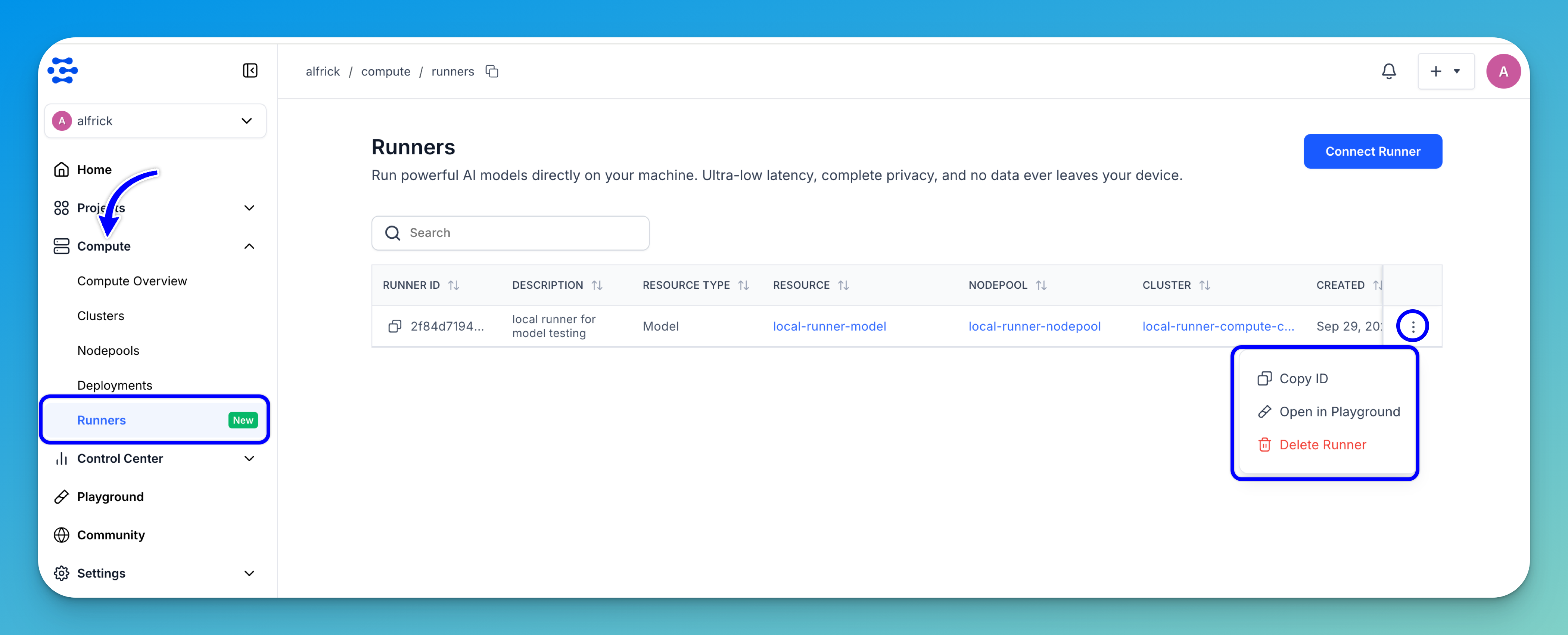
You can also open the Runners dashboard, find your runner, and select Open in Playground from the three-dot menu.
When you're done, close the terminal running the local runner to shut it down.