Environment Secrets
Create, store, and manage environment variables and secrets
Environment secrets are securely encrypted values that function as environment variables within your workflows.
They enable you to store and manage sensitive configuration data, such as third-party API keys, without hardcoding them into your scripts.
Via the UI
The Clarifai platform offers an intuitive interface for creating, managing, and securing your environment secrets.
To create a secret, log in to the Clarifai platform. Then, in the collapsible left sidebar, select Settings and choose Secrets from the dropdown list.
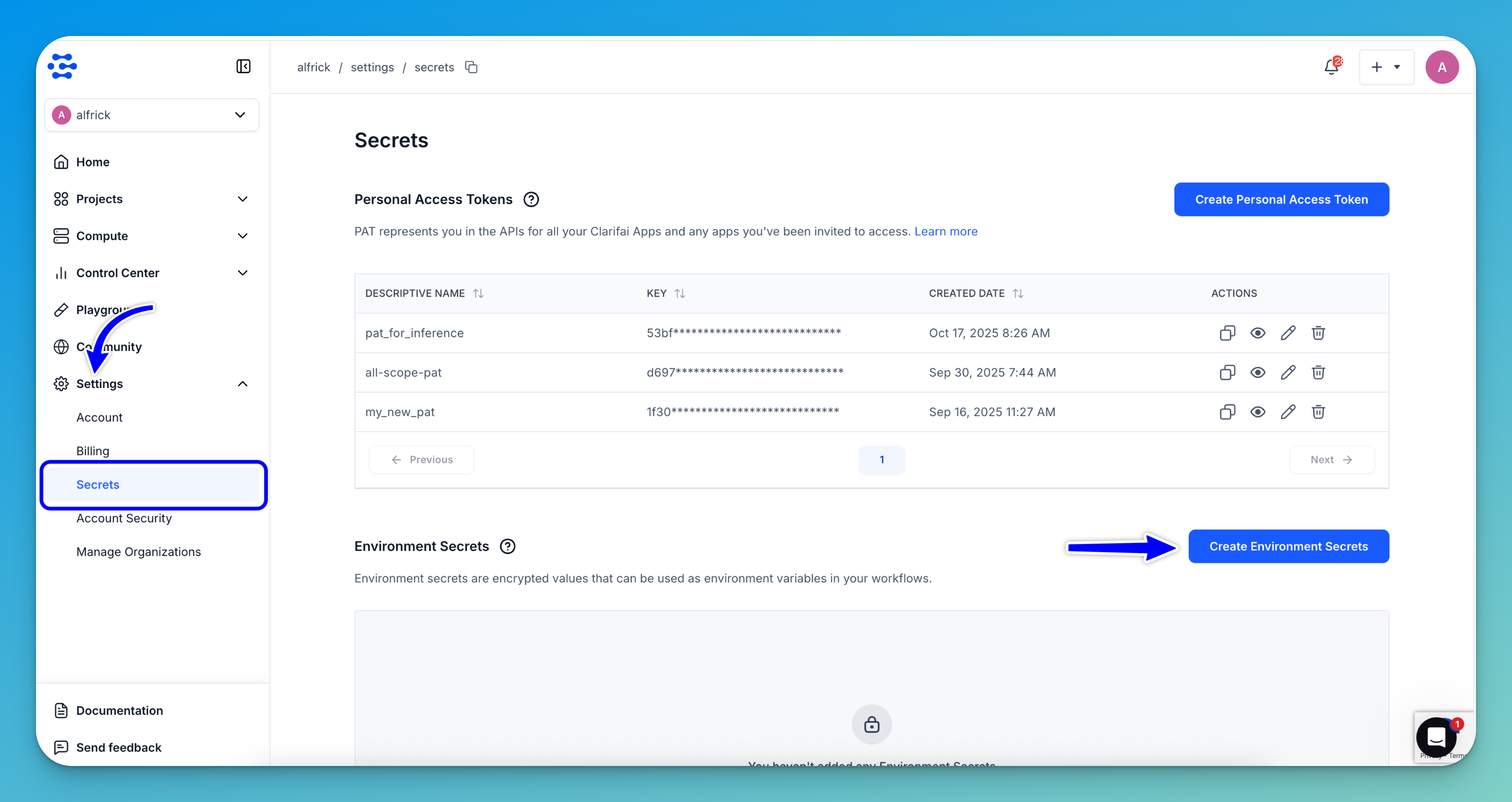
On the ensuing Secrets page, click the Create Environment Secrets button.
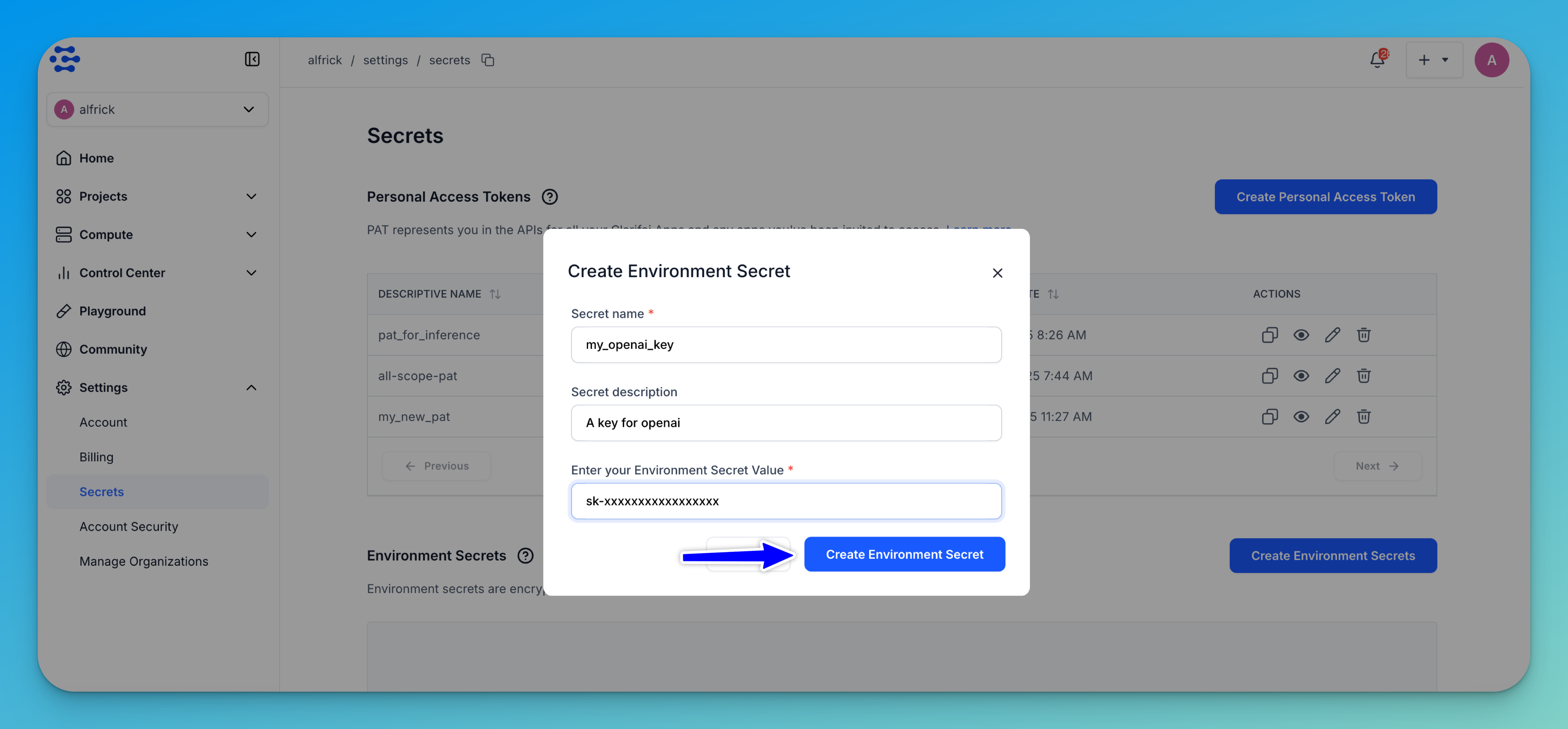
Next, on the form that pops up, enter a required name for your secret, an optional short description, and the required value.
Lastly, click the Create Environment Secret button.
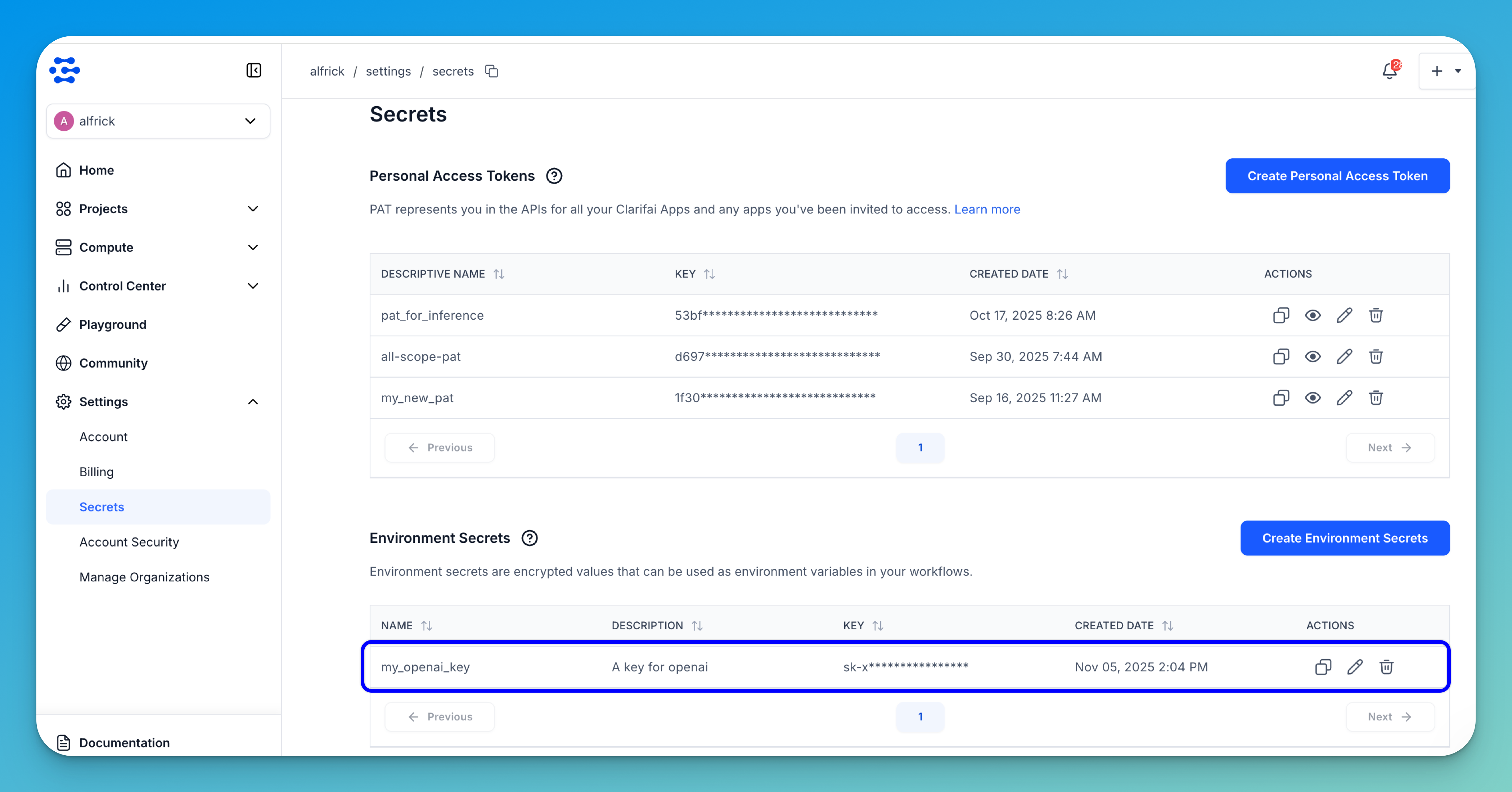
The new secret will be listed in the Environment Secrets section, where you can copy, view, edit, or delete it.
- Environment secrets do not expire. In case your secret gets compromised, you should delete it, and create a new one.
- We recommend that you do not share your secrets with other users.
Via the API
Prerequisites
Install Python SDK
Install the latest version of the Clarifai Python SDK package.
- Bash
pip install --upgrade clarifai
Get Credentials
Go to your Clarifai account and retrieve the following credentials:
- User ID – In the collapsible left sidebar, select Settings and choose Account from the dropdown list. Then, locate your user ID.
- PAT – From the same Settings option, choose Secrets to generate or copy your Personal Access Token (PAT). This token is used to authenticate your connection with the Clarifai platform.
You can then set the PAT as an environment variable using CLARIFAI_PAT.
- Unix-Like Systems
- Windows
export CLARIFAI_PAT=YOUR_PERSONAL_ACCESS_TOKEN_HERE
set CLARIFAI_PAT=YOUR_PERSONAL_ACCESS_TOKEN_HERE
Create
You can create a new environment secret by providing its ID and value.
- Python SDK
- cURL
from clarifai.client.user import User

# Set PAT as an environment variable before running this snippet:
#   export CLARIFAI_PAT=YOUR_PAT_HERE # Unix-Like Systems
#   set CLARIFAI_PAT=YOUR_PAT_HERE  # Windows

# # Initialize User client
client = User(user_id="YOUR_USER_ID")

# Create one or more secrets
secrets = [
    {
        "id": "OPENAI_KEY_2025",
        "value": "your_super_secret_api_key_here",
        "description": "My OpenAI key for experiments"
    }
]

created_secrets = client.create_secrets(secrets)
print("Created Secrets:", created_secrets)
curl -X POST "https://api.clarifai.com/v2/users/YOUR_USER_ID_HERE/secrets" \
  -H "Authorization: Key YOUR_PAT_HERE" \
  -H "Content-Type: application/json" \
  -d '{
    "secrets": [
      {
        "id": "OPENAI_KEY_2025",
        "value": "your_super_secret_api_key_here",
        "description": "My OpenAI key for experiments"
      }
    ]
  }'
Example Output
[INFO] 12:18:09.938891 Secrets created successfully:
code: SUCCESS
description: "Ok"
req_id: "sdk-python-11.8.2-8839a40ace044545a2a1f7b803d60719"
 |  thread=8800297152
Created Secrets: [{'auth': <clarifai.client.auth.helper.ClarifaiAuthHelper object at 0x104692720>, 'value': 'your_super_secret_api_key_here', 'version': 1, 'description': 'My OpenAI key for experiments', 'created_at': seconds: 1759483090
, 'modified_at': seconds: 1759483090
, 'expires_at': '1970-01-01T00:00:00Z', 'user_id': 'alfrick', 'secret_id': 'OPENAI_KEY_20251'}]
Get
You can get an existing environment secret by providing its ID.
- Python SDK
- cURL
from clarifai.client.user import User

# Set PAT as an environment variable before running this snippet:
#   export CLARIFAI_PAT=YOUR_PAT_HERE # Unix-Like Systems
#   set CLARIFAI_PAT=YOUR_PAT_HERE  # Windows

# Initialize User client
client = User(user_id="YOUR_USER_ID")

# Retrieve a specific secret by its ID
secret_info = client.get_secret(secret_id="OPENAI_KEY_2025")
print("Secret Info:", secret_info)
curl -X GET "https://api.clarifai.com/v2/users/YOUR_USER_ID_HERE/secrets/YOUR_SECRET_ID_HERE" \
  -H "Authorization: Key YOUR_PAT_HERE" \
  -H "Content-Type: application/json"
Example Output
Secret Info: {'auth': <clarifai.client.auth.helper.ClarifaiAuthHelper object at 0x105512840>, 'value': 'your_super_secret_api_key_here', 'version': 1, 'description': 'My OpenAI key for experiments', 'created_at': seconds: 1759480228
, 'modified_at': seconds: 1759480228
, 'expires_at': '1970-01-01T00:00:00Z', 'user_id': 'alfrick', 'secret_id': 'OPENAI_KEY_2025'}
List
You can list all the environment secrets you have.
- Python SDK
- cURL
from clarifai.client.user import User

# Set PAT as an environment variable before running this snippet:
#   export CLARIFAI_PAT=YOUR_PAT_HERE # Unix-Like Systems
#   set CLARIFAI_PAT=YOUR_PAT_HERE  # Windows

# Initialize User client
client = User(user_id="YOUR_USER_ID")

# List all secrets
all_secrets = list(client.list_secrets(page_no=1))

print("Secrets:")
for secret in all_secrets:
    print(secret)
curl -X GET "https://api.clarifai.com/v2/users/YOUR_USER_ID_HERE/secrets" \
  -H "Authorization: Key YOUR_PAT_HERE" \
Note: If you specify
page_nobut notper_page, pagination defaults to 16 items per page. If bothpage_noandper_pageare left asNone, all resources are listed without pagination.
Example Output
Secrets:
{'auth': <clarifai.client.auth.helper.ClarifaiAuthHelper object at 0x10436aff0>, 'value': 'your_super_secret_api_key_here', 'version': 1, 'description': 'My OpenAI key for experiments', 'created_at': seconds: 1759483090
, 'modified_at': seconds: 1759483090
, 'expires_at': '1970-01-01T00:00:00Z', 'user_id': 'alfrick', 'secret_id': 'OPENAI_KEY_20251'}
{'auth': <clarifai.client.auth.helper.ClarifaiAuthHelper object at 0x10436aff0>, 'value': 'your_super_secret_api_key_here', 'version': 1, 'description': 'My OpenAI key for experiments', 'created_at': seconds: 1759492357
, 'modified_at': seconds: 1759492357
, 'expires_at': '1970-01-01T00:00:00Z', 'user_id': 'alfrick', 'secret_id': 'OPENAI_KEY_2025'}
Update
You can update an existing environment secret by providing its ID.
- Python SDK
from clarifai.client.user import User

# Initialize the client
client = User(user_id="YOUR_USER_ID")

# Update an existing secret's description or value
patched_secrets = client.patch_secrets(
    secrets=[
        {
            "id": "OPENAI_KEY_2025",
            "value": "new_secret_value",
            "description": "Updated Secret Description"
        }
    ],
    action="overwrite"  # Can also be "remove"
)

print("Patched Secrets:", patched_secrets)
Example Output
[INFO] 14:36:12.091449 Secrets patched successfully:
code: SUCCESS
description: "Ok"
req_id: "sdk-python-11.8.2-56d27720c1d7481ea77f3e8b617ead90"
 |  thread=8800297152
Patched Secrets: [{'auth': <clarifai.client.auth.helper.ClarifaiAuthHelper object at 0x107dcd370>, 'value': 'new_secret_value', 'version': 1, 'description': 'Updated Secret Description', 'created_at': seconds: 1759480228
, 'modified_at': seconds: 1759480228
, 'expires_at': '1970-01-01T00:00:00Z', 'user_id': 'alfrick', 'secret_id': 'OPENAI_KEY_2025'}]
Delete
You can delete an existing environment secret by providing its ID.
- Python SDK
from clarifai.client.user import User

client = User(user_id="YOUR_USER_ID")

# Delete one or more secrets
client.delete_secrets(secret_ids=["OPENAI_KEY_2025"])
Example Output
[INFO] 14:47:45.514014
Secrets Deleted
code: SUCCESS
description: "Ok"
req_id: "sdk-python-11.8.2-4274906bf01b4cbc91295a51de29aa2f"
 |  thread=8800297152
Use Case Examples
Custom Models
The config.yaml file defines the build, deployment, and runtime configuration for a custom model on the Clarifai platform.
You can also use this file to reference sensitive configuration values without hardcoding them into your application code.
The following example shows how to define a secret when deploying the GitHub MCP server to the Clarifai platform:
model:
  id: github-mcp-server
  model_type_id: mcp

build_info:
  python_version: "3.11"
  node_version: "20.11.1"

compute:
  instance: t3a.2xlarge

secrets:
  - id: "github_personal_access_token"
    type: "env"
    env_var: "GITHUB_PERSONAL_ACCESS_TOKEN"
    description: "GitHub personal access token"

mcp_server:
  command: "npx"
  args: ["-y", "@modelcontextprotocol/server-github"]
In this configuration:
idspecifies the secret identifier stored in Clarifai’s secret manager.env_vardefines the environment variable name that will be available inside the runtime environment.- The secret value is injected securely during deployment and never stored directly in the project files.
Your application can then read the secret using a standard environment variable:
import os

github_token = os.environ["GITHUB_PERSONAL_ACCESS_TOKEN"]
Pipelines
Clarifai Pipelines allow you to design and run asynchronous, multi-step AI workflows on the platform.
The root config.yaml file defines the pipeline’s identity, structure, and orchestration logic. It specifies which steps the pipeline contains and how they are executed.
You can also use this configuration to securely inject secrets into specific pipeline steps.
Below is an example showing how to reference secrets in the root config.yaml file of a pipeline project:
pipeline:
  id: "hello-world-pipeline"
  user_id: "user-id"
  app_id: "app-id"
  step_directories:
    - stepA
    - stepB
  orchestration_spec:
    argo_orchestration_spec: |
      apiVersion: argoproj.io/v1alpha1
      kind: Workflow
      spec:
        entrypoint: sequence
        arguments:
          parameters:
            - name: input_text
              value: "Input Text Here"
        templates:
        - name: sequence
          steps:
          - - name: step-0
              templateRef:
                name: users/user-id/apps/app-id/pipeline_steps/stepA
                template: users/user-id/apps/app-id/pipeline_steps/stepA
              arguments:
                parameters:
                  - name: input_text
                    value: "{{workflow.parameters.input_text}}"
          - - name: step-1
              templateRef:
                name: users/user-id/apps/app-id/pipeline_steps/stepB
                template: users/user-id/apps/app-id/pipeline_steps/stepB
              arguments:
                parameters:
                  - name: input_text
                    value: "{{workflow.parameters.input_text}}"

  config:
    step_version_secrets:
      step-0:
        API_KEY: users/user-id/apps/secrets/my-api-key
        DB_PASSWORD: users/user-id/apps/secrets/db-secret
      step-1:
        EMAIL_TOKEN: users/user-id/apps/secrets/email-token
In this configuration:
- Each key (for example,
API_KEYorDB_PASSWORD) becomes an environment variable within the corresponding pipeline step. - The values reference secrets stored in the Clarifai secrets manager, ensuring they remain encrypted and access-controlled.
Once the pipeline runs, the secrets are available in your step code through standard environment variables.
Example (pipeline_step.py):
import os

api_key = os.environ["API_KEY"]
At runtime, the platform securely injects the secret value into the environment, allowing your code to use it without exposing sensitive information in your project files.