Manage Your Compute
Edit and delete deployments, nodepools, and clusters
You can efficiently manage your deployments, nodepools, and clusters within the Clarifai's platform to optimize performance and costs, as well as fine-tune your compute environment for tasks like model inference.
You can easily edit configurations, adjust resource allocations, or remove unused resources to free up compute infrastructure as your workload requirements evolve.
Via the UI
Deployments
The Deployments page provides a centralized workspace for viewing, monitoring, and managing all deployments across your compute infrastructure.
To access the page, expand the Compute section in the collapsible left navigation sidebar and select Deployments.
This opens a comprehensive dashboard where you can track deployment activity, monitor resource usage, and perform deployment-related actions from a single interface.
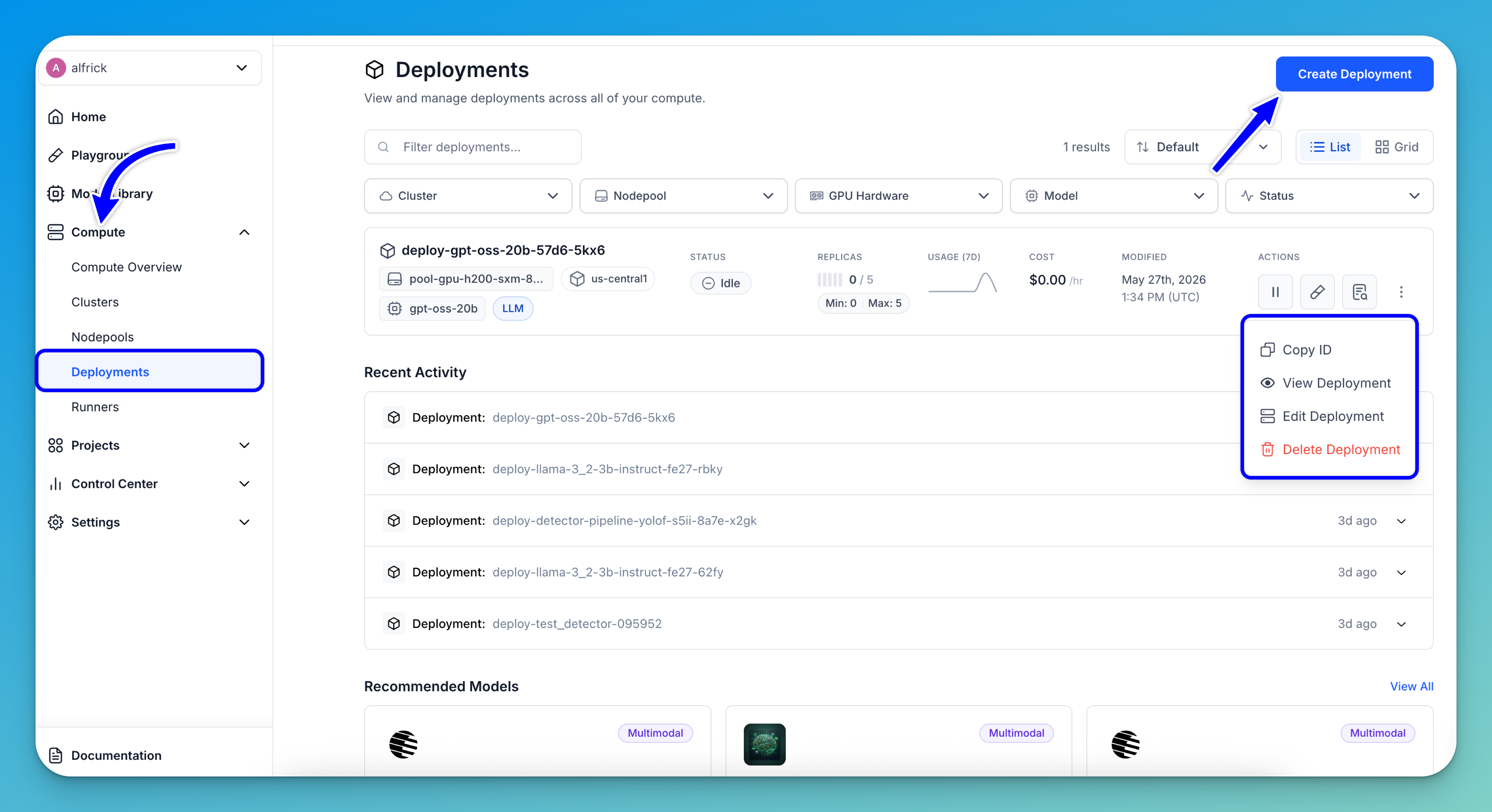
From the Deployments page, you can:
- Create a deployment — Click the Create Deployment button in the upper-right corner to deploy a new model.
- Filter deployments — Quickly narrow down deployments using the filter controls at the top of the page. You can filter by Cluster, Nodepool, GPU Hardware, Model, or deployment Status.
- View deployment details — Each deployment row displays key information, including the deployment name, associated model, nodepool, region, current status, replica configuration, usage metrics, estimated cost, and last modified date.
- Monitor deployment status — Easily identify the current state of a deployment, such as
Idlewhen no replicas are running, along with configured minimum and maximum replica limits. - Manage deployments — Use the action controls on each deployment row to:
- Pause traffic; that is, scale the deployment to zero replicas (stopping all traffic until restarted)
- Open the deployed model in the Playground for testing
- View deployment logs and runtime details
- Access additional actions — Click the three-dot menu at the end of a deployment row to open additional management options, including:
- Copy the deployment ID
- View the deployment
- Edit the deployment
- Delete the deployment
- Track activity trends — The activity graph provides a quick visual overview of recent deployment activities and usage patterns over the past several days.
Note: The page also includes sorting and layout options, allowing you to switch between List and Grid views for easier deployment management.
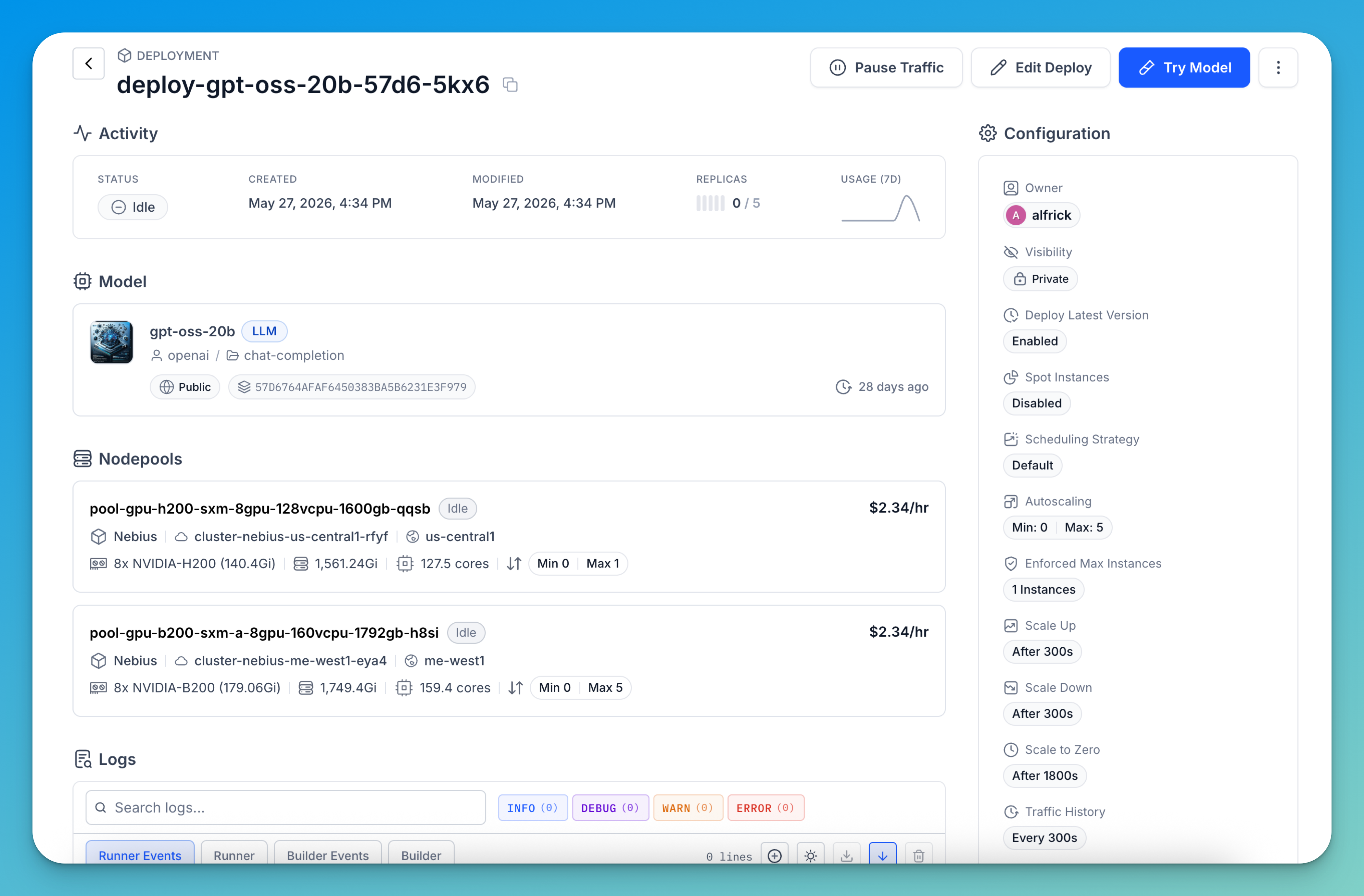
If you click a deployment listed on the page, you'll be redirected to its dedicated details page, where you can view deployment information, monitor runtime activity, manage scaling and traffic settings, access logs, and perform additional deployment management tasks.
Nodepools
The Nodepools page provides a centralized view for managing the compute resources available across your clusters. It allows you to monitor nodepool capacity, hardware configuration, deployment usage, and operational status from a single interface.
To access the page, expand the Compute section in the collapsible left navigation sidebar and select Nodepools.
This opens the Nodepools dashboard, where you can view, filter, and manage all nodepools across your infrastructure.
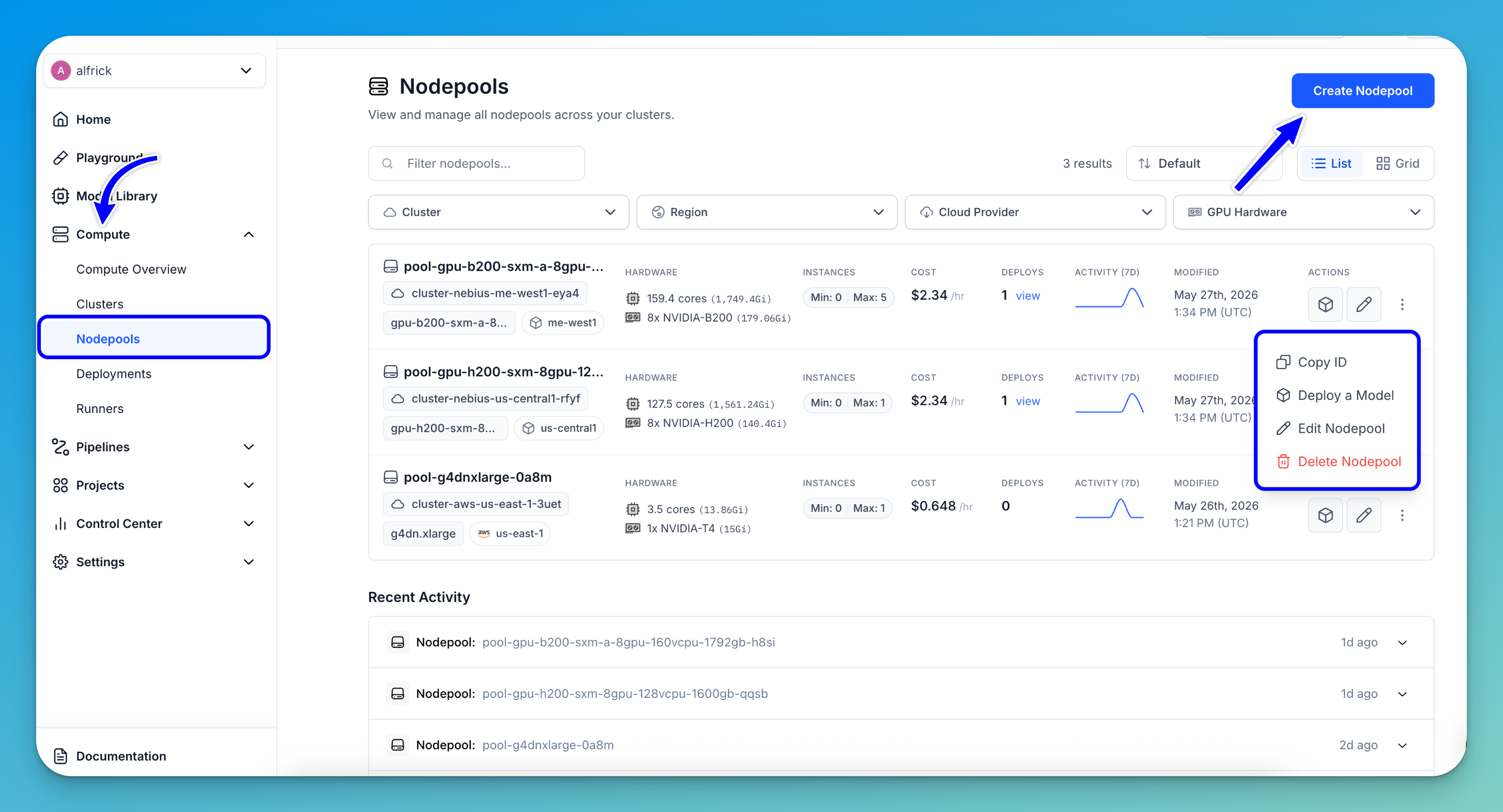
From the Nodepools page, you can:
- Create a nodepool — Click the Create Nodepool button in the upper-right corner to provision a new nodepool with your preferred infrastructure and hardware configuration.
- Filter nodepools — Use the filters at the top of the page to quickly locate nodepools by Cluster, Region, Cloud Provider, or GPU Hardware.
- View nodepool details — Each nodepool row displays important information, including:
- Associated cluster and region
- Hardware specifications such as CPU, memory, and GPU type
- Minimum and maximum instance limits
- Hourly cost estimates
- Number of active deployments
- Monitor compute capacity — Easily track configured scaling limits and available hardware resources for each nodepool.
- View deployment usage — The Deploys column shows how many deployments are currently using a nodepool, with quick access to view associated deployments.
- Manage nodepools — Use the action controls on each row to:
- Deploy a model to the nodepool
- Edit the nodepool configuration
- Access additional actions — Clicking the three-dot menu opens a pop-up menu with additional management options, including:
- Copy the nodepool ID
- Deploy a Model
- Edit the nodepool
- Delete the nodepool
- Track activity trends — The activity graph provides a quick visual overview of recent nodepool activities and usage patterns over the past several days.
Note: The page also supports List and Grid layouts, allowing you to choose the view that best fits your workflow and monitoring preferences.
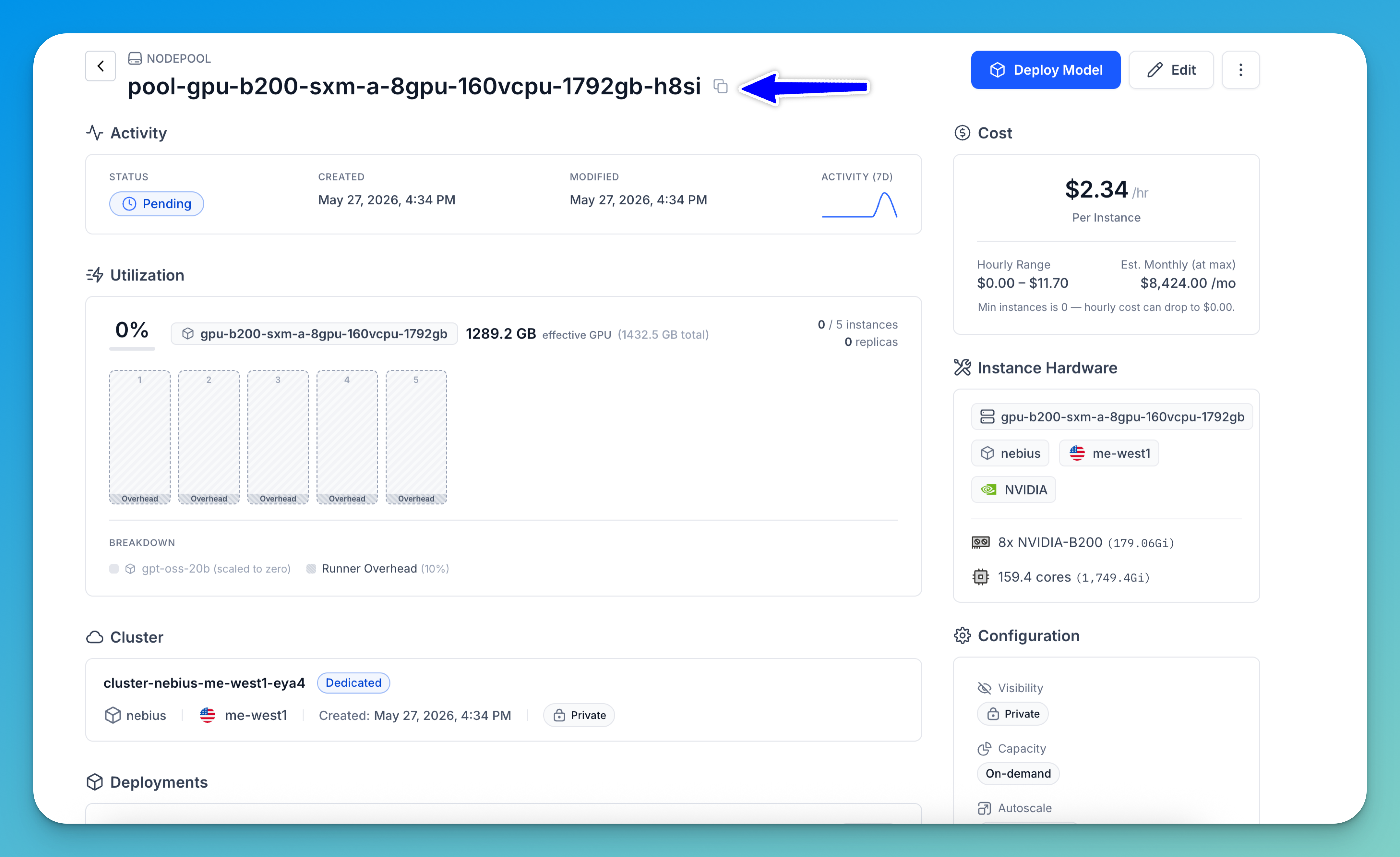
If you click a nodepool listed on the page, you'll be redirected to its dedicated details page, where you can view additional information, monitor activity, and perform further management and configuration tasks for that nodepool.
Clusters
The Clusters page provides a centralized view for managing all compute clusters across your environments. It allows you to monitor cluster configuration, deployment usage, nodepool allocation, and overall infrastructure status from a single interface.
To access the page, expand the Compute section in the collapsible left navigation sidebar and select Clusters. This opens the Clusters dashboard, where you can view, filter, and manage all available clusters.
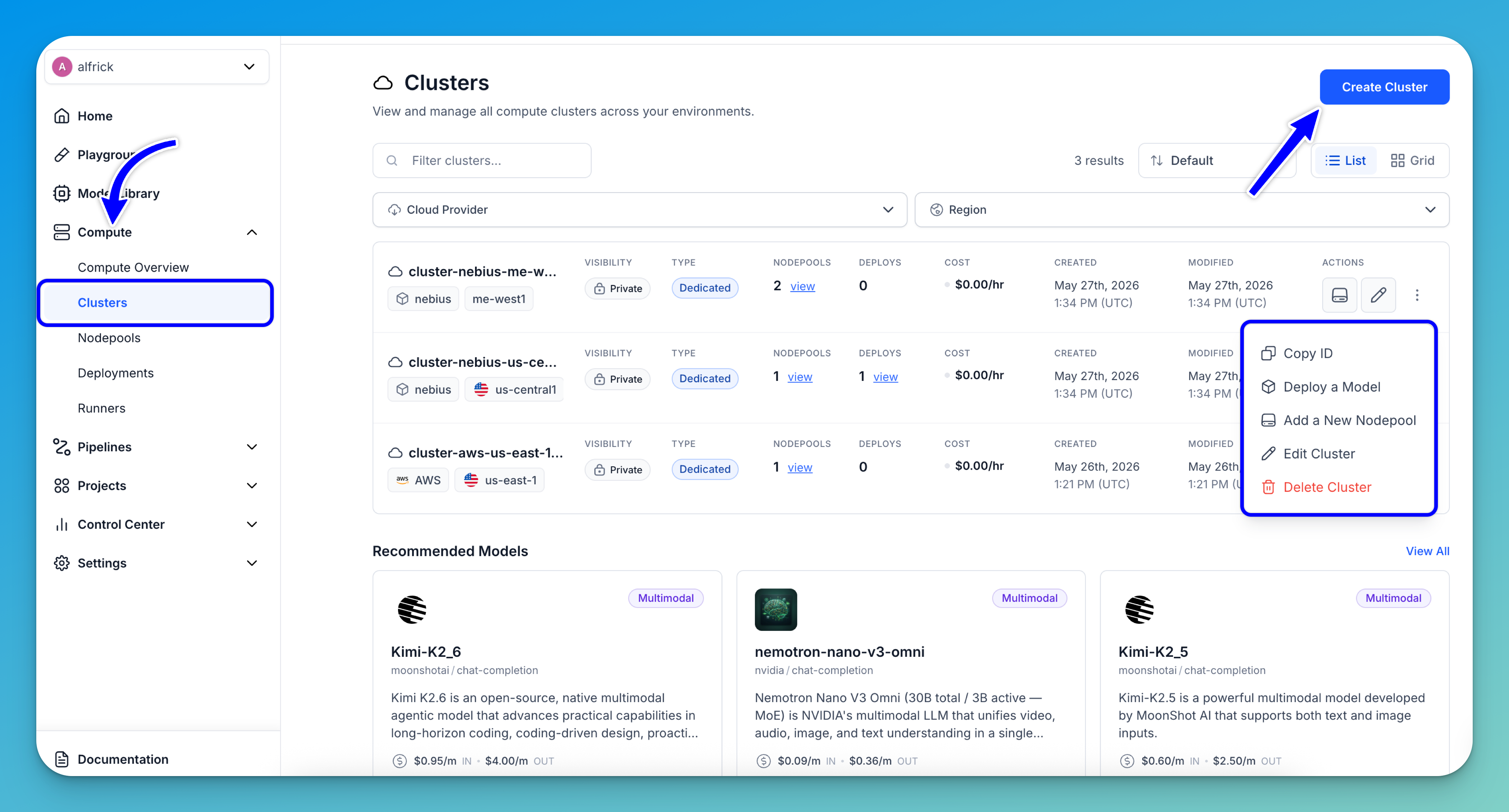
From the Clusters page, you can:
- Create a cluster — Click the Create Cluster button in the upper-right corner to provision a new cluster.
- Filter clusters — Use the filter controls at the top of the page to quickly find clusters by Cloud Provider or Region.
- View cluster details — Each cluster row displays important information, including:
- Cloud provider and region
- Visibility settings
- Cluster type
- Estimated cost
- Monitor infrastructure usage — Quickly view how many nodepools and deployments are associated with each cluster, helping you track infrastructure utilization and workload distribution.
- Manage clusters — Use the action controls on each row to:
- Add a nodepool to the cluster
- Edit cluster settings
- Access additional actions — Clicking the three-dot menu opens a pop-up menu with additional management options, including:
- Copy cluster ID
- Deploy a model
- Add a new nodepool
- Edit the cluster
- Delete the cluster
Note: The page supports both List and Grid layouts, allowing you to switch between viewing styles based on your workflow and monitoring preferences.
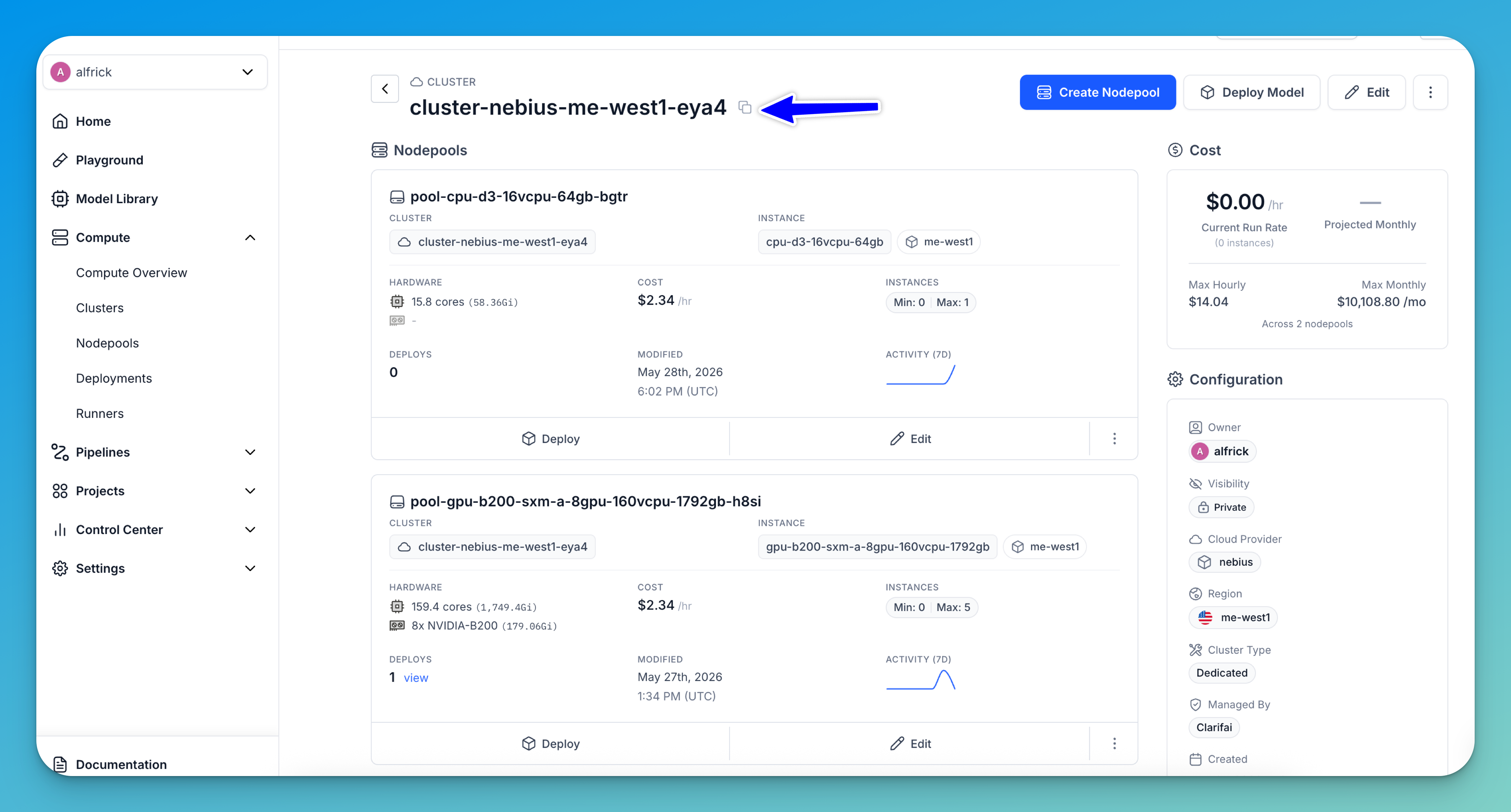
If you click a cluster listed on the page, you'll be redirected to its dedicated details page, where you can view additional information, monitor cluster activity, manage associated nodepools and deployments, and perform further configuration and administrative tasks.
Via the API
A Personal Access Token (PAT) authenticates your connection to the Clarifai platform, including CLI sessions. Set the token as an environment variable as explained previously.
Clusters
Get a Cluster
To get the details of your compute cluster, pass the compute_cluster_id to the compute_cluster method of the User class.
- Python
- cURL
from clarifai.client.user import User

# Set PAT as an environment variable
#   export CLARIFAI_PAT=YOUR_PAT_HERE # Unix-Like Systems
#   set CLARIFAI_PAT=YOUR_PAT_HERE  # Windows

# Initialize the client
client = User(
    user_id="YOUR_USER_ID_HERE"
)

# Get and print the compute cluster by providing its ID
compute_cluster = client.compute_cluster(
    compute_cluster_id="test-compute-cluster"
)
print(compute_cluster)
curl -X GET "https://api.clarifai.com/v2/users/YOUR_USER_ID_HERE/compute_clusters/YOUR_COMPUTE_CLUSTER_HERE" \
  -H "Authorization: Key YOUR_PAT_HERE" \
  -H "Content-Type: application/json"
Example Output
Clarifai Compute Cluster Details:
description=My AWS compute cluster, cloud_provider=id: "aws"
name: "AWS"
, region=us-east-1, created_at=seconds: 1757331634
nanos: 59523000
, modified_at=seconds: 1757331634
nanos: 59523000
, visibility=gettable: PRIVATE
, cluster_type=dedicated, managed_by=clarifai, key=id: "****"
, id=test-compute-cluster, user_id=alfrick
List All Clusters
To list all your existing compute clusters, call the list_compute_clusters method of the User class.
- Python
- CLI
- cURL
from clarifai.client.user import User

# Set PAT as an environment variable
#   export CLARIFAI_PAT=YOUR_PAT_HERE # Unix-Like Systems
#   set CLARIFAI_PAT=YOUR_PAT_HERE  # Windows

# Initialize the client
client = User(
    user_id="YOUR_USER_ID_HERE"
)

# Fetch all compute clusters
all_compute_clusters = client.list_compute_clusters()

# Print them as a list
print("Available Compute Clusters:")
for cluster in all_compute_clusters:
    print(f"- ID: {cluster.id}, Description: {cluster.description}, Region: {cluster.region}")
clarifai computecluster list
curl -X GET "https://api.clarifai.com/v2/users/YOUR_USER_ID_HERE/compute_clusters/" \
  -H "Authorization: Key YOUR_PAT_HERE" \
  -H "Content-Type: application/json"
Example Output
Available Compute Clusters:
- ID: advanced-cluster-ebus, Description: , Region: us-east-1
- ID: test-compute-cluster, Description: My AWS compute cluster, Region: us-east-1
Edit a Cluster
You can update an existing cluster by setting "action": "overwrite" in the request body.
- cURL
curl -X PATCH "https://api.clarifai.com/v2/users/YOUR_USER_ID_HERE/compute_clusters/" \
  -H "Authorization: Key YOUR_PAT_HERE" \
  -H "Content-Type: application/json" \
  -d '{
    "action": "overwrite",
    "compute_clusters": [
      {
        "id": "test-aws-cluster",
        "description": "My new cluster description",
        "cloud_provider": {
          "id": "aws"
        },
        "region": "us-east-1",
        "visibility": {
          "gettable": 10
        },
        "managed_by": "clarifai",
        "cluster_type": "dedicated",
        "key": {
          "id": "YOUR_PAT_HERE"
        }
      }
    ]
  }'
Delete Compute Clusters
To delete your compute clusters, provide a list of compute cluster IDs to the delete_compute_clusters method of the User class.
- Python
- CLI
from clarifai.client.user import User

# Set PAT as an environment variable
#   export CLARIFAI_PAT=YOUR_PAT_HERE # Unix-Like Systems
#   set CLARIFAI_PAT=YOUR_PAT_HERE  # Windows

# Initialize the User client
client = User(
    user_id="YOUR_USER_ID_HERE"
)

# Get all compute clusters associated with the user
all_compute_clusters = list(client.list_compute_clusters())

# Extract compute cluster IDs for deletion
compute_cluster_ids = [compute_cluster.id for compute_cluster in all_compute_clusters]

# Delete a specific cluster by providing its ID
# compute_cluster_ids = ["test-compute-cluster"]

# Delete all the compute clusters
client.delete_compute_clusters(compute_cluster_ids=compute_cluster_ids)
clarifai computecluster delete COMPUTE_CLUSTER_ID
Example Output
Compute Cluster Deleted
code: SUCCESS
description: "Ok"
req_id: "sdk-python-11.7.5-dc2a5ef7b8824ed0999dad18b5594a12"
Nodepools
Get a Nodepool
To get the details of your nodepool, provide the nodepool_id to the nodepool method of the ComputeCluster class.
- Python
- cURL
from clarifai.client.compute_cluster import ComputeCluster

# Set PAT as an environment variable
#   export CLARIFAI_PAT=YOUR_PAT_HERE # Unix-Like Systems
#   set CLARIFAI_PAT=YOUR_PAT_HERE  # Windows

# Initialize the ComputeCluster instance
compute_cluster = ComputeCluster(
    user_id="YOUR_USER_ID_HERE",
    compute_cluster_id="test-compute-cluster"
)

# Get and print the nodepool by providing its ID
nodepool = compute_cluster.nodepool(
    nodepool_id="test-nodepool"
)
print(nodepool)
curl -X GET "https://api.clarifai.com/v2/users/YOUR_USER_ID_HERE/compute_clusters/YOUR_COMPUTE_CLUSTER_ID_HERE/nodepools/YOUR_NODEPOOL_ID_HERE" \
  -H "Authorization: Key YOUR_PAT_HERE" \
  -H "Content-Type: application/json"
Example Output
Nodepool Details:
description=First nodepool in AWS in a proper compute cluster, created_at=seconds: 1757331678
nanos: 990816000
, modified_at=seconds: 1757331678
nanos: 990816000
, compute_cluster=id: "test-compute-cluster"
description: "My AWS compute cluster"
cloud_provider {
id: "aws"
name: "AWS"
}
region: "us-east-1"
user_id: "alfrick"
created_at {
seconds: 1757331634
nanos: 59523000
}
modified_at {
seconds: 1757331634
nanos: 59523000
}
visibility {
gettable: PRIVATE
}
cluster_type: "dedicated"
managed_by: "clarifai"
key {
id: "****"
}
, node_capacity_type=capacity_types: ON_DEMAND_TYPE
, instance_types=[id: "g5.2xlarge"
description: "g5.2xlarge"
compute_info {
cpu_memory: "29033Mi"
num_accelerators: 1
accelerator_memory: "23028Mi"
accelerator_type: "NVIDIA-A10G"
cpu_limit: "7525m"
}
price: "42.000000"
cloud_provider {
id: "aws"
name: "aws"
}
region: "us-east-1"
], max_instances=1, visibility=gettable: PRIVATE
, enforced_max_instances=1, id=test-nodepool
List All Nodepools
To list all the existing nodepools in your cluster, call the list_nodepools method of the ComputeCluster class.
- Python
- CLI
- cURL
- cURL (with min replicas)
from clarifai.client.compute_cluster import ComputeCluster

# Set PAT as an environment variable
#   export CLARIFAI_PAT=YOUR_PAT_HERE # Unix-Like Systems
#   set CLARIFAI_PAT=YOUR_PAT_HERE  # Windows

# Initialize the ComputeCluster instance
compute_cluster = ComputeCluster(
    user_id="YOUR_USER_ID_HERE",
    compute_cluster_id="test-compute-cluster"
)

# Fetch all nodepools
all_nodepools = compute_cluster.list_nodepools()

# Print them as a list
print("Available Nodepools:")
for nodepool in all_nodepools:
    print(f"- ID: {nodepool.id}, Description: {nodepool.description}, "
          f"Min Instances: {nodepool.min_instances}, Max Instances: {nodepool.max_instances}")
clarifai nodepool list # List all nodepools across all compute clusters
clarifai nodepool list COMPUTE_CLUSTER_ID # List all nodepools in a specific compute cluster
curl -X GET "https://api.clarifai.com/v2/users/YOUR_USER_ID_HERE/compute_clusters/YOUR_COMPUTE_CLUSTER_ID_HERE/nodepools/" \
  -H "Authorization: Key YOUR_PAT_HERE" \
  -H "Content-Type: application/json"
curl -X GET "https://api.clarifai.com/v2/users/YOUR_USER_ID_HERE/compute_clusters/YOUR_COMPUTE_CLUSTER_ID_HERE/nodepools/?min_runner_replicas=1" \
  -H "Authorization: Key YOUR_PAT_HERE" \
  -H "Content-Type: application/json"
Example Output
Available Nodepools:
- ID: test-nodepool, Description: First nodepool in AWS in a proper compute cluster, Min Instances: 0, Max Instances: 1
Edit a Nodepool
You can update an existing nodepool by setting "action": "overwrite" in the request body.
- cURL
curl -X PATCH "https://api.clarifai.com/v2/users/YOUR_USER_ID_HERE/compute_clusters/YOUR_COMPUTE_CLUSTER_ID_HERE/nodepools" \
  -H "Authorization: Key YOUR_PAT_HERE" \
  -H "Content-Type: application/json" \
  -d '{
    "action": "overwrite",
    "nodepools": [
      {
        "id": "test-nodepool-6",
        "visibility": {
          "gettable": 10
        },
        "min_instances": 0,
        "node_capacity_type": {
          "capacity_types": [2]
        }
      }
    ]
  }'
Delete Nodepools
To delete your nodepools, provide a list of nodepool IDs to the delete_nodepools method of the ComputeCluster class.
- Python
- CLI
from clarifai.client.compute_cluster import ComputeCluster

# Set PAT as an environment variable
#   export CLARIFAI_PAT=YOUR_PAT_HERE # Unix-Like Systems
#   set CLARIFAI_PAT=YOUR_PAT_HERE  # Windows

# Initialize the ComputeCluster instance
compute_cluster = ComputeCluster(
    user_id="YOUR_USER_ID_HERE",
    compute_cluster_id="test-compute-cluster"
)

# Get all nodepools within the compute cluster
all_nodepools = list(compute_cluster.list_nodepools())

# Extract nodepool IDs for deletion
nodepool_ids = [nodepool.id for nodepool in all_nodepools]

# Delete a specific nodepool by providing its ID
# nodepool_ids = ["test-nodepool"]

# Delete  all the nodepools
compute_cluster.delete_nodepools(nodepool_ids=nodepool_ids)
clarifai nodepool delete COMPUTE_CLUSTER_ID NODEPOOL_ID
Example Output
Nodepools Deleted
code: SUCCESS
description: "Ok"
req_id: "sdk-python-11.7.5-d69f92a0263b41719b51083f44d6ed43"
Deployments
Get a Deployment
To get the details of your deployment, provide the deployment_id to the deployment method of the Nodepool class.
- Python
- cURL
from clarifai.client.nodepool import Nodepool

# Set PAT as an environment variable
#   export CLARIFAI_PAT=YOUR_PAT_HERE # Unix-Like Systems
#   set CLARIFAI_PAT=YOUR_PAT_HERE  # Windows

# Initialize the Nodepool instance
nodepool = Nodepool(
    user_id="YOUR_USER_ID_HERE",
    nodepool_id="test-nodepool"
)

# Get and print the deployment by providing its ID
deployment = nodepool.deployment(
    deployment_id="test-deployment"
)
print(deployment)
curl -X GET "https://api.clarifai.com/v2/users/YOUR_USER_ID_HERE/deployments/YOUR_DEPLOYMENT_ID_HERE" \
  -H "Authorization: Key YOUR_PAT_HERE" \
  -H "Content-Type: application/json"
Example Output
Deployment Details:
autoscale_config=max_replicas: 5
traffic_history_seconds: 300
scale_down_delay_seconds: 300
scale_up_delay_seconds: 300
scale_to_zero_delay_seconds: 1800
, nodepools=[id: "test-nodepool"
description: "First nodepool in AWS in a proper compute cluster"
created_at {
  seconds: 1757331678
  nanos: 990816000
}
modified_at {
  seconds: 1757331678
  nanos: 990816000
}
compute_cluster {
  id: "test-compute-cluster"
  description: "My AWS compute cluster"
  cloud_provider {
    id: "aws"
    name: "AWS"
  }
  region: "us-east-1"
  user_id: "alfrick"
  created_at {
    seconds: 1757331634
    nanos: 59523000
  }
  modified_at {
    seconds: 1757331634
    nanos: 59523000
  }
  visibility {
    gettable: PRIVATE
  }
  cluster_type: "dedicated"
  managed_by: "clarifai"
  key {
    id: "****"
  }
}
node_capacity_type {
  capacity_types: ON_DEMAND_TYPE
}
instance_types {
  id: "g5.2xlarge"
  description: "g5.2xlarge"
  compute_info {
    cpu_memory: "29033Mi"
    num_accelerators: 1
    accelerator_memory: "23028Mi"
    accelerator_type: "NVIDIA-A10G"
    cpu_limit: "7525m"
  }
  price: "42.000000"
  cloud_provider {
    id: "aws"
    name: "aws"
  }
  region: "us-east-1"
}
max_instances: 1
visibility {
  gettable: PRIVATE
}
enforced_max_instances: 1
], scheduling_choice=4, visibility=gettable: PRIVATE
, description=some random deployment, worker=model {
  id: "Llama-3_2-3B-Instruct"
  name: "Llama-3_2-3B-Instruct"
  created_at {
    seconds: 1741889414
    nanos: 819619000
  }
  app_id: "Llama-3"
  model_version {
    id: "fe271b43266a45a5b068766b6437687f"
    created_at {
      seconds: 1748538551
      nanos: 64876000
    }
    status {
      code: MODEL_TRAINED
      description: "Model is trained and ready for deployment"
    }
    completed_at {
      seconds: 1748538558
      nanos: 456045000
    }
    visibility {
      gettable: PUBLIC
    }
    app_id: "Llama-3"
    user_id: "meta"
    inference_compute_info {
      cpu_memory: "14Gi"
      num_accelerators: 1
      accelerator_memory: "21Gi"
      accelerator_type: "NVIDIA-A10G"
      accelerator_type: "NVIDIA-L40S"
      accelerator_type: "NVIDIA-A100"
      accelerator_type: "NVIDIA-H100"
      cpu_limit: "3"
    }
    method_signatures {
      name: "predict"
      method_type: UNARY_UNARY
      description: "Method to call from UI\n    "
      input_fields {
        name: "prompt"
        type: STR
        default: "\"\""
      }
      input_fields {
        name: "images"
        type: LIST
        type_args {
          name: "images_item"
          type: IMAGE
        }
        default: "[]"
      }
      input_fields {
        name: "audios"
        type: LIST
        type_args {
          name: "audios_item"
          type: AUDIO
        }
        default: "[]"
      }
      input_fields {
        name: "videos"
        type: LIST
        type_args {
          name: "videos_item"
          type: VIDEO
        }
        default: "[]"
      }
      input_fields {
        name: "chat_history"
        type: LIST
        type_args {
          name: "chat_history_item"
          type: JSON_DATA
        }
        default: "[]"
      }
      input_fields {
        name: "audio"
        type: AUDIO
        default: "null"
      }
      input_fields {
        name: "video"
        type: VIDEO
        default: "null"
      }
      input_fields {
        name: "image"
        type: IMAGE
        default: "null"
      }
      input_fields {
        name: "tools"
        type: LIST
        type_args {
          name: "tools_item"
          type: JSON_DATA
        }
        default: "null"
      }
      input_fields {
        name: "tool_choice"
        type: STR
        default: "null"
      }
      input_fields {
        description: "The system-level prompt used to define the assistant\'s behavior."
        name: "system_prompt"
        type: STR
        default: "\"\""
        is_param: true
      }
      input_fields {
        description: "The maximum number of tokens to generate. Shorter token lengths will provide faster performance."
        name: "max_tokens"
        type: INT
        default: "512"
        is_param: true
      }
      input_fields {
        description: "A decimal number that determines the degree of randomness in the response."
        name: "temperature"
        type: FLOAT
        default: "0.7"
        is_param: true
      }
      input_fields {
        description: "An alternative to sampling with temperature, where the model considers the results of the tokens with top_p probability mass."
        name: "top_p"
        type: FLOAT
        default: "0.9"
        is_param: true
      }
      output_fields {
        name: "return"
        type: STR
      }
    }
    method_signatures {
      name: "generate"
      method_type: UNARY_STREAMING
      description: "Method to call generate from UI\n    "
      input_fields {
        name: "prompt"
        type: STR
        default: "\"\""
      }
      input_fields {
        name: "images"
        type: LIST
        type_args {
          name: "images_item"
          type: IMAGE
        }
        default: "[]"
      }
      input_fields {
        name: "audios"
        type: LIST
        type_args {
          name: "audios_item"
          type: AUDIO
        }
        default: "[]"
      }
      input_fields {
        name: "videos"
        type: LIST
        type_args {
          name: "videos_item"
          type: VIDEO
        }
        default: "[]"
      }
      input_fields {
        name: "chat_history"
        type: LIST
        type_args {
          name: "chat_history_item"
          type: JSON_DATA
        }
        default: "[]"
      }
      input_fields {
        name: "audio"
        type: AUDIO
        default: "null"
      }
      input_fields {
        name: "video"
        type: VIDEO
        default: "null"
      }
      input_fields {
        name: "image"
        type: IMAGE
        default: "null"
      }
      input_fields {
        name: "tools"
        type: LIST
        type_args {
          name: "tools_item"
          type: JSON_DATA
        }
        default: "null"
      }
      input_fields {
        name: "tool_choice"
        type: STR
        default: "null"
      }
      input_fields {
        description: "The system-level prompt used to define the assistant\'s behavior."
        name: "system_prompt"
        type: STR
        default: "\"\""
        is_param: true
      }
      input_fields {
        description: "The maximum number of tokens to generate. Shorter token lengths will provide faster performance."
        name: "max_tokens"
        type: INT
        default: "512"
        is_param: true
      }
      input_fields {
        description: "A decimal number that determines the degree of randomness in the response."
        name: "temperature"
        type: FLOAT
        default: "0.7"
        is_param: true
      }
      input_fields {
        description: "An alternative to sampling with temperature, where the model considers the results of the tokens with top_p probability mass."
        name: "top_p"
        type: FLOAT
        default: "0.9"
        is_param: true
      }
      output_fields {
        name: "return"
        type: STR
        iterator: true
      }
    }
    method_signatures {
      name: "openai_transport"
      method_type: UNARY_UNARY
      description: "The single model method to get the OpenAI-compatible request and send it to the OpenAI server\n  then return its response.\n\nArgs:\n    msg: JSON string containing the request parameters\n\nReturns:\n    JSON string containing the response or error"
      input_fields {
        required: true
        name: "msg"
        type: STR
      }
      output_fields {
        name: "return"
        type: STR
      }
    }
    method_signatures {
      name: "openai_stream_transport"
      method_type: UNARY_STREAMING
      description: "Process an OpenAI-compatible request and return a streaming response iterator.\nThis method is used when stream=True and returns an iterator of strings directly,\nwithout converting to a list or JSON serializing.\n\nArgs:\n    msg: The request as a JSON string.\n\nReturns:\n    Iterator[str]: An iterator yielding text chunks from the streaming response."
      input_fields {
        required: true
        name: "msg"
        type: STR
      }
      output_fields {
        name: "return"
        type: STR
        iterator: true
      }
    }
  }
  user_id: "meta"
  model_type_id: "text-to-text"
  visibility {
    gettable: PUBLIC
  }
  description: "Llama 3.2 (3B) is a multilingual, instruction-tuned LLM by Meta, optimized for dialogue, retrieval, and summarization. It uses an autoregressive transformer with SFT and RLHF for improved alignment and outperforms many industry models."
  modified_at {
    seconds: 1751896217
    nanos: 890327000
  }
  workflow_recommended {
    value: true
  }
  image {
    url: "https://data.clarifai.com/large/users/meta/apps/Llama-3/input_owners/phatvo/inputs/image/7b9fe837fdb9ed1272b35c98ef3b6245"
    hosted {
      prefix: "https://data.clarifai.com"
      suffix: "users/meta/apps/Llama-3/input_owners/phatvo/inputs/image/7b9fe837fdb9ed1272b35c98ef3b6245"
      sizes: "large"
      sizes: "small"
      crossorigin: "use-credentials"
    }
  }
  billing_type: Tokens
  featured_order {
    value: 9950
  }
}
, created_at=seconds: 1757331930
nanos: 95906000
, modified_at=seconds: 1757331930
nanos: 95906000
, id=test-deployment, user_id=alfrick
List All Deployments
To list all the existing deployments in your nodepool, call the list_deployments method of the Nodepool class.
- Python
- CLI
from clarifai.client.nodepool import Nodepool

# Set PAT as an environment variable
#   export CLARIFAI_PAT=YOUR_PAT_HERE # Unix-Like Systems
#   set CLARIFAI_PAT=YOUR_PAT_HERE  # Windows

# Initialize the Nodepool instance
nodepool = Nodepool(
    user_id="YOUR_USER_ID_HERE",
    nodepool_id="test-nodepool"
)

# Fetch all deployments
all_deployments = nodepool.list_deployments()

# Print them as a list
print("Available Deployments:")
for deployment in all_deployments:
    print(f"- ID: {deployment.id}, Description: {deployment.description}, "
          f"Min Replicas: {deployment.autoscale_config.min_replicas}, "
          f"Max Replicas: {deployment.autoscale_config.max_replicas}")
clarifai deployment list # List all deployments across all nodepools
clarifai deployment list NODEPOOL_ID # List all deployments in a specific nodepool
Example Output
Available Deployments:
- ID: test-deployment, Description: some random deployment, Min Replicas: 0, Max Replicas: 5
Edit a Deployment
You can update an existing deployment by setting "action": "overwrite" in the request body.
- cURL
curl -X PATCH "https://api.clarifai.com/v2/users/YOUR_USER_ID_HERE/deployments/" \
  -H "Authorization: Key YOUR_PAT_HERE" \
  -H "Content-Type: application/json" \
  -d '{
    "action": "overwrite",
    "deployments": [
      {
        "id": "test-nodepool",
        "description": "some new random deployment",
        "user_id": "YOUR_USER_ID_HERE",
        "autoscale_config": {
          "min_replicas": 0,
          "max_replicas": 10,
          "traffic_history_seconds": 100,
          "scale_down_delay_seconds": 30,
          "scale_to_zero_delay_seconds": 30,
          "scale_up_delay_seconds": 30,
          "disable_packing": true
        },
        "worker": {
          "model": {
            "id": "Llama-3_2-3B-Instruct",
            "model_version": {
              "id": "fe271b43266a45a5b068766b6437687f"
            },
            "user_id": "meta",
            "app_id": "Llama-3"
          }
        },
        "scheduling_choice": 4,
        "visibility": {
          "gettable": 10
        }
      }
    ]
  }'
Delete Deployments
To delete your deployments, pass a list of deployment IDs to the delete_deployments method of the Nodepool class.
- Python
- CLI
from clarifai.client.nodepool import Nodepool

# Set PAT as an environment variable
#   export CLARIFAI_PAT=YOUR_PAT_HERE # Unix-Like Systems
#   set CLARIFAI_PAT=YOUR_PAT_HERE  # Windows

# Initialize the Nodepool instance
nodepool = Nodepool(
    user_id="YOUR_USER_ID_HERE",
    nodepool_id="test-nodepool"
)

# Get all the deployments in the nodepool
all_deployments = list(nodepool.list_deployments())

# Extract deployment IDs for deletion
deployment_ids = [deployment.id for deployment in all_deployments]

# Delete a specific deployment by providing its deployment ID
# deployment_ids = ["test-deployment"]

# Delete all the deployments
nodepool.delete_deployments(deployment_ids=deployment_ids)
clarifai deployment delete NODEPOOL_ID DEPLOYMENT_ID
Example Output
Deployments Deleted
code: SUCCESS
description: "Ok"
req_id: "sdk-python-11.7.5-a08b6c5f21674916ba5791df8eae5dd8"
List Cloud Providers
You can retrieve the available cloud providers to use when creating clusters and nodepools.
- cURL
curl -X GET "https://api.clarifai.com/v2/cloud_providers/" \
  -H "Authorization: Key YOUR_PAT_HERE"
Example Output
{
    "status": {
        "code": 10000,
        "description": "Ok",
        "req_id": "4fc1ee4bd6a74215b363f30d28db4732"
    },
    "cloud_providers": [{
        "id": "aws",
        "name": "aws"
    }, {
        "id": "gcp",
        "name": "gcp"
    }, {
        "id": "azure",
        "name": "azure"
    }, {
        "id": "vultr",
        "name": "vultr"
    }, {
        "id": "oracle",
        "name": "oracle"
    }]
}
List Regions
You can retrieve the geographic regions supported by a cloud provider.
- cURL
curl -X GET "https://api.clarifai.com/v2/cloud_providers/{{cloud_provider_id}}/regions/" \
  -H "Authorization: Key YOUR_PAT_HERE"
Example Output
{
    "status": {
        "code": 10000,
        "description": "Ok",
        "req_id": "03c7a7a98a0f4e18a8a5818faf8e0a7c"
    },
    "regions": ["us-east-1"]
}
List Instance Types
You can retrieve the instance types a cloud provider offers in a given region.
- cURL
curl -X GET "https://api.clarifai.com/v2/cloud_providers/{{cloud_provider_id}}/regions/{{region_id}}/instance_types" \
  -H "Authorization: Key YOUR_PAT_HERE"
Example Output
{
    "status": {
        "code": 10000,
        "description": "Ok",
        "req_id": "1b7713b74b3643fda13d83802cd4036d"
    },
    "instance_types": [{
        "id": "t3a.medium",
        "description": "t3a.medium",
        "compute_info": {
            "cpu_limit": "1545m",
            "cpu_memory": "2962Mi"
        },
        "price": "2.000000",
        "cloud_provider": {
            "id": "aws",
            "name": "aws"
        },
        "region": "us-east-1",
        "feature_flag_group": "ComputeResourceSmall"
    }, {
        "id": "t3a.large",
        "description": "t3a.large",
        "compute_info": {
            "cpu_limit": "1545m",
            "cpu_memory": "6553Mi"
        },
        "price": "3.000000",
        "cloud_provider": {
            "id": "aws",
            "name": "aws"
        },
        "region": "us-east-1",
        "feature_flag_group": "ComputeResourceSmall"
    }, {
        "id": "t3a.xlarge",
        "description": "t3a.xlarge",
        "compute_info": {
            "cpu_limit": "3535m",
            "cpu_memory": "13878Mi"
        },
        "price": "5.000000",
        "cloud_provider": {
            "id": "aws",
            "name": "aws"
        },
        "region": "us-east-1",
        "feature_flag_group": "ComputeResourceSmall"
    }, {
        "id": "t3a.2xlarge",
        "description": "t3a.2xlarge",
        "compute_info": {
            "cpu_limit": "7525m",
            "cpu_memory": "29033Mi"
        },
        "price": "10.000000",
        "cloud_provider": {
            "id": "aws",
            "name": "aws"
        },
        "region": "us-east-1",
        "feature_flag_group": "ComputeResourceSmall"
    }, {
        "id": "g4dn.xlarge",
        "description": "g4dn.xlarge",
        "compute_info": {
            "cpu_limit": "3535m",
            "cpu_memory": "14197Mi",
            "num_accelerators": 1,
            "accelerator_memory": "15360Mi",
            "accelerator_type": ["NVIDIA-T4"]
        },
        "price": "18.000000",
        "cloud_provider": {
            "id": "aws",
            "name": "aws"
        },
        "region": "us-east-1",
        "feature_flag_group": "ComputeResourceSmall"
    }, {
        "id": "g5.xlarge",
        "description": "g5.xlarge",
        "compute_info": {
            "cpu_limit": "3535m",
            "cpu_memory": "13878Mi",
            "num_accelerators": 1,
            "accelerator_memory": "23028Mi",
            "accelerator_type": ["NVIDIA-A10G"]
        },
        "price": "35.000000",
        "cloud_provider": {
            "id": "aws",
            "name": "aws"
        },
        "region": "us-east-1",
        "feature_flag_group": "ComputeResourceSmall"
    }, {
        "id": "g5.2xlarge",
        "description": "g5.2xlarge",
        "compute_info": {
            "cpu_limit": "7525m",
            "cpu_memory": "29033Mi",
            "num_accelerators": 1,
            "accelerator_memory": "23028Mi",
            "accelerator_type": ["NVIDIA-A10G"]
        },
        "price": "42.000000",
        "cloud_provider": {
            "id": "aws",
            "name": "aws"
        },
        "region": "us-east-1",
        "feature_flag_group": "ComputeResourceSmall"
    }, {
        "id": "g6.xlarge",
        "description": "g6.xlarge",
        "compute_info": {
            "cpu_limit": "3535m",
            "cpu_memory": "13878Mi",
            "num_accelerators": 1,
            "accelerator_memory": "23034Mi",
            "accelerator_type": ["NVIDIA-L4"]
        },
        "price": "28.000000",
        "cloud_provider": {
            "id": "aws",
            "name": "aws"
        },
        "region": "us-east-1",
        "feature_flag_group": "ComputeResourceSmall"
    }, {
        "id": "g6.2xlarge",
        "description": "g6.2xlarge",
        "compute_info": {
            "cpu_limit": "7525m",
            "cpu_memory": "29033Mi",
            "num_accelerators": 1,
            "accelerator_memory": "23034Mi",
            "accelerator_type": ["NVIDIA-L4"]
        },
        "price": "34.000000",
        "cloud_provider": {
            "id": "aws",
            "name": "aws"
        },
        "region": "us-east-1",
        "feature_flag_group": "ComputeResourceSmall"
    }, {
        "id": "g6e.xlarge",
        "description": "g6e.xlarge",
        "compute_info": {
            "cpu_limit": "3535m",
            "cpu_memory": "29033Mi",
            "num_accelerators": 1,
            "accelerator_memory": "46068Mi",
            "accelerator_type": ["NVIDIA-L40S"]
        },
        "price": "65.000000",
        "cloud_provider": {
            "id": "aws",
            "name": "aws"
        },
        "region": "us-east-1",
        "feature_flag_group": "ComputeResourceMedium"
    }, {
        "id": "g6e.2xlarge",
        "description": "g6e.2xlarge",
        "compute_info": {
            "cpu_limit": "7525m",
            "cpu_memory": "59343Mi",
            "num_accelerators": 1,
            "accelerator_memory": "46068Mi",
            "accelerator_type": ["NVIDIA-L40S"]
        },
        "price": "78.000000",
        "cloud_provider": {
            "id": "aws",
            "name": "aws"
        },
        "region": "us-east-1",
        "feature_flag_group": "ComputeResourceMedium"
    }, {
        "id": "g6e.12xlarge",
        "description": "g6e.12xlarge",
        "compute_info": {
            "cpu_limit": "47425m",
            "cpu_memory": "359873Mi",
            "num_accelerators": 4,
            "accelerator_memory": "46068Mi",
            "accelerator_type": ["NVIDIA-L40S"]
        },
        "price": "364.000000",
        "cloud_provider": {
            "id": "aws",
            "name": "aws"
        },
        "region": "us-east-1",
        "feature_flag_group": "ComputeResourceLarge"
    }]
}
List All Instance Types
You can retrieve all instance types offered by all cloud providers across their supported regions.
- cURL
curl -X GET "https://api.clarifai.com/v2/cloud_providers/all/regions/all/instance_types/" \
  -H "Authorization: Key YOUR_PAT_HERE"
Example Output
{
"status": {
"code": 10000,
"description": "Ok",
"req_id": "c57a6284e829442884e3daa41bd8cbe1"
},
"instance_types": [{
"id": "t3a.medium",
"description": "t3a.medium",
"compute_info": {
"cpu_limit": "1545m",
"cpu_memory": "2962Mi"
},
"price": "2.000000",
"cloud_provider": {
"id": "aws",
"name": "aws"
},
"region": "us-east-1",
"feature_flag_group": "ComputeResourceSmall"
}, {
"id": "t3a.large",
"description": "t3a.large",
"compute_info": {
"cpu_limit": "1545m",
"cpu_memory": "6553Mi"
},
"price": "3.000000",
"cloud_provider": {
"id": "aws",
"name": "aws"
},
"region": "us-east-1",
"feature_flag_group": "ComputeResourceSmall"
}, {
"id": "t3a.xlarge",
"description": "t3a.xlarge",
"compute_info": {
"cpu_limit": "3535m",
"cpu_memory": "13878Mi"
},
"price": "5.000000",
"cloud_provider": {
"id": "aws",
"name": "aws"
},
"region": "us-east-1",
"feature_flag_group": "ComputeResourceSmall"
}, {
"id": "t3a.2xlarge",
"description": "t3a.2xlarge",
"compute_info": {
"cpu_limit": "7525m",
"cpu_memory": "29033Mi"
},
"price": "10.000000",
"cloud_provider": {
"id": "aws",
"name": "aws"
},
"region": "us-east-1",
"feature_flag_group": "ComputeResourceSmall"
}, {
"id": "g4dn.xlarge",
"description": "g4dn.xlarge",
"compute_info": {
"cpu_limit": "3535m",
"cpu_memory": "14197Mi",
"num_accelerators": 1,
"accelerator_memory": "15360Mi",
"accelerator_type": ["NVIDIA-T4"]
},
"price": "18.000000",
"cloud_provider": {
"id": "aws",
"name": "aws"
},
"region": "us-east-1",
"feature_flag_group": "ComputeResourceSmall"
}, {
"id": "g5.xlarge",
"description": "g5.xlarge",
"compute_info": {
"cpu_limit": "3535m",
"cpu_memory": "13878Mi",
"num_accelerators": 1,
"accelerator_memory": "23028Mi",
"accelerator_type": ["NVIDIA-A10G"]
},
"price": "35.000000",
"cloud_provider": {
"id": "aws",
"name": "aws"
},
"region": "us-east-1",
"feature_flag_group": "ComputeResourceSmall"
}, {
"id": "g5.2xlarge",
"description": "g5.2xlarge",
"compute_info": {
"cpu_limit": "7525m",
"cpu_memory": "29033Mi",
"num_accelerators": 1,
"accelerator_memory": "23028Mi",
"accelerator_type": ["NVIDIA-A10G"]
},
"price": "42.000000",
"cloud_provider": {
"id": "aws",
"name": "aws"
},
"region": "us-east-1",
"feature_flag_group": "ComputeResourceSmall"
}, {
"id": "g6.xlarge",
"description": "g6.xlarge",
"compute_info": {
"cpu_limit": "3535m",
"cpu_memory": "13878Mi",
"num_accelerators": 1,
"accelerator_memory": "23034Mi",
"accelerator_type": ["NVIDIA-L4"]
},
"price": "28.000000",
"cloud_provider": {
"id": "aws",
"name": "aws"
},
"region": "us-east-1",
"feature_flag_group": "ComputeResourceSmall"
}, {
"id": "g6.2xlarge",
"description": "g6.2xlarge",
"compute_info": {
"cpu_limit": "7525m",
"cpu_memory": "29033Mi",
"num_accelerators": 1,
"accelerator_memory": "23034Mi",
"accelerator_type": ["NVIDIA-L4"]
},
"price": "34.000000",
"cloud_provider": {
"id": "aws",
"name": "aws"
},
"region": "us-east-1",
"feature_flag_group": "ComputeResourceSmall"
}, {
"id": "g6e.xlarge",
"description": "g6e.xlarge",
"compute_info": {
"cpu_limit": "3535m",
"cpu_memory": "29033Mi",
"num_accelerators": 1,
"accelerator_memory": "46068Mi",
"accelerator_type": ["NVIDIA-L40S"]
},
"price": "65.000000",
"cloud_provider": {
"id": "aws",
"name": "aws"
},
"region": "us-east-1",
"feature_flag_group": "ComputeResourceMedium"
}, {
"id": "g6e.2xlarge",
"description": "g6e.2xlarge",
"compute_info": {
"cpu_limit": "7525m",
"cpu_memory": "59343Mi",
"num_accelerators": 1,
"accelerator_memory": "46068Mi",
"accelerator_type": ["NVIDIA-L40S"]
},
"price": "78.000000",
"cloud_provider": {
"id": "aws",
"name": "aws"
},
"region": "us-east-1",
"feature_flag_group": "ComputeResourceMedium"
}, {
"id": "g6e.12xlarge",
"description": "g6e.12xlarge",
"compute_info": {
"cpu_limit": "47425m",
"cpu_memory": "359873Mi",
"num_accelerators": 4,
"accelerator_memory": "46068Mi",
"accelerator_type": ["NVIDIA-L40S"]
},
"price": "364.000000",
"cloud_provider": {
"id": "aws",
"name": "aws"
},
"region": "us-east-1",
"feature_flag_group": "ComputeResourceLarge"
}, {
"id": "a2-ultragpu-1g",
"description": "a2-ultragpu-1g",
"compute_info": {
"cpu_limit": "11338m",
"cpu_memory": "163054Mi",
"num_accelerators": 1,
"accelerator_memory": "81920Mi",
"accelerator_type": ["NVIDIA-A100"]
},
"price": "198.000000",
"cloud_provider": {
"id": "gcp",
"name": "gcp"
},
"region": "us-east4",
"feature_flag_group": "ComputeResourceMedium"
}, {
"id": "a3-highgpu-1g",
"description": "a3-highgpu-1g",
"compute_info": {
"cpu_limit": "25303m",
"cpu_memory": "227280Mi",
"num_accelerators": 1,
"accelerator_memory": "81559Mi",
"accelerator_type": ["NVIDIA-H100"]
},
"price": "384.000000",
"cloud_provider": {
"id": "gcp",
"name": "gcp"
},
"region": "us-east4",
"allowed_capacity_types": {
"capacity_types": [2]
},
"feature_flag_group": "ComputeResourceLarge"
}, {
"id": "ct5lp-hightpu-1t",
"description": "ct5lp-hightpu-1t",
"compute_info": {
"cpu_limit": "23308m",
"cpu_memory": "43740Mi",
"num_accelerators": 1,
"accelerator_type": ["GOOGLE-TPU-v5e"],
"accelerator_topology": ["1x1"]
},
"price": "65.000000",
"cloud_provider": {
"id": "gcp",
"name": "gcp"
},
"region": "us-central1",
"feature_flag_group": "ComputeResourceLarge"
}, {
"id": "ct5lp-hightpu-4t",
"description": "ct5lp-hightpu-4t",
"compute_info": {
"cpu_limit": "111088m",
"cpu_memory": "185132Mi",
"num_accelerators": 4,
"accelerator_type": ["GOOGLE-TPU-v5e"],
"accelerator_topology": ["2x2"]
},
"price": "65.000000",
"cloud_provider": {
"id": "gcp",
"name": "gcp"
},
"region": "us-central1",
"feature_flag_group": "ComputeResourceLarge"
}, {
"id": "ct5p-hightpu-4t",
"description": "ct5p-hightpu-4t",
"compute_info": {
"cpu_limit": "206848m",
"cpu_memory": "442033Mi",
"num_accelerators": 4,
"accelerator_type": ["GOOGLE-TPU-v5p"],
"accelerator_topology": ["2x2x1"]
},
"price": "65.000000",
"cloud_provider": {
"id": "gcp",
"name": "gcp"
},
"region": "us-central1",
"feature_flag_group": "ComputeResourceLarge"
}, {
"id": "ct6e-standard-1t",
"description": "ct6e-standard-1t",
"compute_info": {
"cpu_limit": "43258m",
"cpu_memory": "442033Mi",
"num_accelerators": 1,
"accelerator_type": ["GOOGLE-TPU-v6e"],
"accelerator_topology": ["1x1"]
},
"price": "65.000000",
"cloud_provider": {
"id": "gcp",
"name": "gcp"
},
"region": "us-central1",
"feature_flag_group": "ComputeResourceLarge"
}, {
"id": "ct6e-standard-4t",
"description": "ct6e-standard-4t",
"compute_info": {
"cpu_limit": "178918m",
"cpu_memory": "714990Mi",
"num_accelerators": 4,
"accelerator_type": ["GOOGLE-TPU-v6e"],
"accelerator_topology": ["2x2"]
},
"price": "65.000000",
"cloud_provider": {
"id": "gcp",
"name": "gcp"
},
"region": "us-central1",
"feature_flag_group": "ComputeResourceLarge"
}, {
"id": "g2-standard-12",
"description": "g2-standard-12",
"compute_info": {
"cpu_limit": "11338m",
"cpu_memory": "43740Mi",
"num_accelerators": 1,
"accelerator_memory": "23034Mi",
"accelerator_type": ["NVIDIA-L4"]
},
"price": "35.000000",
"cloud_provider": {
"id": "gcp",
"name": "gcp"
},
"region": "us-east4",
"feature_flag_group": "ComputeResourceSmall"
}, {
"id": "g2-standard-16",
"description": "g2-standard-16",
"compute_info": {
"cpu_limit": "15328m",
"cpu_memory": "59141Mi",
"num_accelerators": 1,
"accelerator_memory": "23034Mi",
"accelerator_type": ["NVIDIA-L4"]
},
"price": "40.000000",
"cloud_provider": {
"id": "gcp",
"name": "gcp"
},
"region": "us-east4",
"feature_flag_group": "ComputeResourceSmall"
}, {
"id": "g2-standard-32",
"description": "g2-standard-32",
"compute_info": {
"cpu_limit": "31288m",
"cpu_memory": "120906Mi",
"num_accelerators": 1,
"accelerator_memory": "23034Mi",
"accelerator_type": ["NVIDIA-L4"]
},
"price": "60.000000",
"cloud_provider": {
"id": "gcp",
"name": "gcp"
},
"region": "us-east4",
"feature_flag_group": "ComputeResourceSmall"
}, {
"id": "g2-standard-4",
"description": "g2-standard-4",
"compute_info": {
"cpu_limit": "3358m",
"cpu_memory": "12938Mi",
"num_accelerators": 1,
"accelerator_memory": "23034Mi",
"accelerator_type": ["NVIDIA-L4"]
},
"price": "25.000000",
"cloud_provider": {
"id": "gcp",
"name": "gcp"
},
"region": "us-east4",
"feature_flag_group": "ComputeResourceSmall"
}, {
"id": "g2-standard-8",
"description": "g2-standard-8",
"compute_info": {
"cpu_limit": "7348m",
"cpu_memory": "28339Mi",
"num_accelerators": 1,
"accelerator_memory": "23034Mi",
"accelerator_type": ["NVIDIA-L4"]
},
"price": "30.000000",
"cloud_provider": {
"id": "gcp",
"name": "gcp"
},
"region": "us-east4",
"feature_flag_group": "ComputeResourceSmall"
}, {
"id": "n2-standard-16",
"description": "n2-standard-16",
"compute_info": {
"cpu_limit": "15328m",
"cpu_memory": "59141Mi"
},
"price": "30.000000",
"cloud_provider": {
"id": "gcp",
"name": "gcp"
},
"region": "us-east4",
"feature_flag_group": "ComputeResourceSmall"
}, {
"id": "n2-standard-2",
"description": "n2-standard-2",
"compute_info": {
"cpu_limit": "1368m",
"cpu_memory": "5546Mi"
},
"price": "4.000000",
"cloud_provider": {
"id": "gcp",
"name": "gcp"
},
"region": "us-east4",
"feature_flag_group": "ComputeResourceSmall"
}, {
"id": "n2-standard-4",
"description": "n2-standard-4",
"compute_info": {
"cpu_limit": "3358m",
"cpu_memory": "12938Mi"
},
"price": "8.000000",
"cloud_provider": {
"id": "gcp",
"name": "gcp"
},
"region": "us-east4",
"feature_flag_group": "ComputeResourceSmall"
}, {
"id": "n2-standard-8",
"description": "n2-standard-8",
"compute_info": {
"cpu_limit": "7348m",
"cpu_memory": "28339Mi"
},
"price": "15.000000",
"cloud_provider": {
"id": "gcp",
"name": "gcp"
},
"region": "us-east4",
"feature_flag_group": "ComputeResourceSmall"
}, {
"id": "a2-ultragpu-1g",
"description": "a2-ultragpu-1g",
"compute_info": {
"cpu_limit": "11338m",
"cpu_memory": "163054Mi",
"num_accelerators": 1,
"accelerator_memory": "81920Mi",
"accelerator_type": ["NVIDIA-A100"]
},
"price": "198.000000",
"cloud_provider": {
"id": "gcp",
"name": "gcp"
},
"region": "us-east4",
"feature_flag_group": "ComputeResourceMedium"
}, {
"id": "a3-highgpu-1g",
"description": "a3-highgpu-1g",
"compute_info": {
"cpu_limit": "25303m",
"cpu_memory": "227280Mi",
"num_accelerators": 1,
"accelerator_memory": "81559Mi",
"accelerator_type": ["NVIDIA-H100"]
},
"price": "384.000000",
"cloud_provider": {
"id": "gcp",
"name": "gcp"
},
"region": "us-east4",
"allowed_capacity_types": {
"capacity_types": [2]
},
"feature_flag_group": "ComputeResourceLarge"
}, {
"id": "a3-highgpu-8g",
"description": "a3-highgpu-8g",
"compute_info": {
"cpu_limit": "206848m",
"cpu_memory": "1871045Mi",
"num_accelerators": 8,
"accelerator_memory": "81559Mi",
"accelerator_type": ["NVIDIA-H100"]
},
"price": "3073.000000",
"cloud_provider": {
"id": "gcp",
"name": "gcp"
},
"region": "us-east4",
"feature_flag_group": "ComputeResourceLarge"
}, {
"id": "g2-standard-12",
"description": "g2-standard-12",
"compute_info": {
"cpu_limit": "11338m",
"cpu_memory": "43740Mi",
"num_accelerators": 1,
"accelerator_memory": "23034Mi",
"accelerator_type": ["NVIDIA-L4"]
},
"price": "35.000000",
"cloud_provider": {
"id": "gcp",
"name": "gcp"
},
"region": "us-east4",
"feature_flag_group": "ComputeResourceSmall"
}, {
"id": "g2-standard-16",
"description": "g2-standard-16",
"compute_info": {
"cpu_limit": "15328m",
"cpu_memory": "59141Mi",
"num_accelerators": 1,
"accelerator_memory": "23034Mi",
"accelerator_type": ["NVIDIA-L4"]
},
"price": "40.000000",
"cloud_provider": {
"id": "gcp",
"name": "gcp"
},
"region": "us-east4",
"feature_flag_group": "ComputeResourceSmall"
}, {
"id": "g2-standard-32",
"description": "g2-standard-32",
"compute_info": {
"cpu_limit": "31288m",
"cpu_memory": "120906Mi",
"num_accelerators": 1,
"accelerator_memory": "23034Mi",
"accelerator_type": ["NVIDIA-L4"]
},
"price": "60.000000",
"cloud_provider": {
"id": "gcp",
"name": "gcp"
},
"region": "us-east4",
"feature_flag_group": "ComputeResourceSmall"
}, {
"id": "g2-standard-4",
"description": "g2-standard-4",
"compute_info": {
"cpu_limit": "3358m",
"cpu_memory": "12938Mi",
"num_accelerators": 1,
"accelerator_memory": "23034Mi",
"accelerator_type": ["NVIDIA-L4"]
},
"price": "25.000000",
"cloud_provider": {
"id": "gcp",
"name": "gcp"
},
"region": "us-east4",
"feature_flag_group": "ComputeResourceSmall"
}, {
"id": "g2-standard-8",
"description": "g2-standard-8",
"compute_info": {
"cpu_limit": "7348m",
"cpu_memory": "28339Mi",
"num_accelerators": 1,
"accelerator_memory": "23034Mi",
"accelerator_type": ["NVIDIA-L4"]
},
"price": "30.000000",
"cloud_provider": {
"id": "gcp",
"name": "gcp"
},
"region": "us-east4",
"feature_flag_group": "ComputeResourceSmall"
}, {
"id": "n2-standard-16",
"description": "n2-standard-16",
"compute_info": {
"cpu_limit": "15328m",
"cpu_memory": "59141Mi"
},
"price": "30.000000",
"cloud_provider": {
"id": "gcp",
"name": "gcp"
},
"region": "us-east4",
"feature_flag_group": "ComputeResourceSmall"
}, {
"id": "n2-standard-2",
"description": "n2-standard-2",
"compute_info": {
"cpu_limit": "1368m",
"cpu_memory": "5546Mi"
},
"price": "4.000000",
"cloud_provider": {
"id": "gcp",
"name": "gcp"
},
"region": "us-east4",
"feature_flag_group": "ComputeResourceSmall"
}, {
"id": "n2-standard-4",
"description": "n2-standard-4",
"compute_info": {
"cpu_limit": "3358m",
"cpu_memory": "12938Mi"
},
"price": "8.000000",
"cloud_provider": {
"id": "gcp",
"name": "gcp"
},
"region": "us-east4",
"feature_flag_group": "ComputeResourceSmall"
}, {
"id": "n2-standard-8",
"description": "n2-standard-8",
"compute_info": {
"cpu_limit": "7348m",
"cpu_memory": "28339Mi"
},
"price": "15.000000",
"cloud_provider": {
"id": "gcp",
"name": "gcp"
},
"region": "us-east4",
"feature_flag_group": "ComputeResourceSmall"
}, {
"id": "cl-xl-gpu-8-b200",
"description": "cl-xl-gpu-8-b200",
"compute_info": {
"cpu_limit": "207305m",
"cpu_memory": "2857011Mi",
"num_accelerators": 8,
"accelerator_memory": "183359Mi",
"accelerator_type": ["NVIDIA-B200"]
},
"price": "65.000000",
"cloud_provider": {
"id": "lambda",
"name": "lambda"
},
"region": "us-south-3",
"feature_flag_group": "ComputeResourceLarge"
}, {
"id": "local",
"description": "local runner",
"compute_info": {
"cpu_limit": "-105m",
"cpu_memory": "-455Mi"
},
"price": "0.000000",
"cloud_provider": {
"id": "local",
"name": "local"
},
"feature_flag_group": "ComputeResourceLocal"
}, {
"id": "BM.GPU.A10.4",
"description": "BM.GPU.A10.4",
"compute_info": {
"cpu_limit": "14788m",
"cpu_memory": "232872Mi",
"num_accelerators": 4,
"accelerator_memory": "23028Mi",
"accelerator_type": ["NVIDIA-A10G"]
},
"price": "65.000000",
"cloud_provider": {
"id": "oracle",
"name": "oracle"
},
"region": "us-chicago-1",
"feature_flag_group": "ComputeResourceMedium"
}, {
"id": "BM.GPU.MI300X.8",
"description": "BM.GPU.MI300X.8",
"compute_info": {
"cpu_limit": "111545m",
"cpu_memory": "1991694Mi",
"num_accelerators": 8,
"accelerator_memory": "127.816Gi",
"accelerator_type": ["AMD-MI300X"]
},
"price": "65.000000",
"cloud_provider": {
"id": "oracle",
"name": "oracle"
},
"region": "us-chicago-1",
"feature_flag_group": "ComputeResourceLarge"
}, {
"id": "VM.GPU.A10.1",
"description": "VM.GPU.A10.1",
"compute_info": {
"cpu_limit": "14788m",
"cpu_memory": "232872Mi",
"num_accelerators": 1,
"accelerator_memory": "23028Mi",
"accelerator_type": ["NVIDIA-A10G"]
},
"price": "65.000000",
"cloud_provider": {
"id": "oracle",
"name": "oracle"
},
"region": "us-chicago-1",
"feature_flag_group": "ComputeResourceSmall"
}, {
"id": "VM.Standard.E6.Flex",
"description": "VM.Standard.E6.Flex",
"compute_info": {
"cpu_limit": "835m",
"cpu_memory": "14964Mi"
},
"price": "65.000000",
"cloud_provider": {
"id": "oracle",
"name": "oracle"
},
"region": "us-chicago-1",
"feature_flag_group": "ComputeResourceSmall"
}, {
"id": "vbm-72c-480gb-gh200-gpu",
"description": "vbm-72c-480gb-gh200-gpu",
"compute_info": {
"cpu_limit": "71415m",
"cpu_memory": "466680Mi",
"num_accelerators": 1,
"accelerator_memory": "97871Mi",
"accelerator_type": ["NVIDIA-GH200"]
},
"price": "111.000000",
"cloud_provider": {
"id": "vultr",
"name": "vultr"
},
"region": "atlanta",
"feature_flag_group": "ComputeResourceMedium"
}, {
"id": "vbm-256c-2048gb-8-mi300x-gpu",
"description": "vbm-256c-2048gb-8-mi300x-gpu",
"compute_info": {
"cpu_limit": "255415m",
"cpu_memory": "1992030Mi",
"num_accelerators": 8,
"accelerator_memory": "127.816Gi",
"accelerator_type": ["AMD-MI300X"]
},
"price": "1109.000000",
"cloud_provider": {
"id": "vultr",
"name": "vultr"
},
"region": "chicago",
"feature_flag_group": "ComputeResourceLarge"
}, {
"id": "vc2-2c-4gb",
"description": "vc2-2c-4gb",
"compute_info": {
"cpu_limit": "1415m",
"cpu_memory": "3627Mi"
},
"price": "1.000000",
"cloud_provider": {
"id": "vultr",
"name": "vultr"
},
"region": "new-york",
"feature_flag_group": "ComputeResourceSmall"
}, {
"id": "vc2-4c-8gb",
"description": "vc2-4c-8gb",
"compute_info": {
"cpu_limit": "3415m",
"cpu_memory": "7518Mi"
},
"price": "2.000000",
"cloud_provider": {
"id": "vultr",
"name": "vultr"
},
"region": "new-york",
"feature_flag_group": "ComputeResourceSmall"
}, {
"id": "vc2-6c-16gb",
"description": "vc2-6c-16gb",
"compute_info": {
"cpu_limit": "5415m",
"cpu_memory": "15300Mi"
},
"price": "4.000000",
"cloud_provider": {
"id": "vultr",
"name": "vultr"
},
"region": "new-york",
"feature_flag_group": "ComputeResourceSmall"
}, {
"id": "vc2-8c-32gb",
"description": "vc2-8c-32gb",
"compute_info": {
"cpu_limit": "7415m",
"cpu_memory": "30865Mi"
},
"price": "8.000000",
"cloud_provider": {
"id": "vultr",
"name": "vultr"
},
"region": "new-york",
"feature_flag_group": "ComputeResourceSmall"
}, {
"id": "vc2-16c-64gb",
"description": "vc2-16c-64gb",
"compute_info": {
"cpu_limit": "15415m",
"cpu_memory": "61995Mi"
},
"price": "15.000000",
"cloud_provider": {
"id": "vultr",
"name": "vultr"
},
"region": "new-york",
"feature_flag_group": "ComputeResourceSmall"
}, {
"id": "vc2-24c-96gb",
"description": "vc2-24c-96gb",
"compute_info": {
"cpu_limit": "23415m",
"cpu_memory": "93124Mi"
},
"price": "30.000000",
"cloud_provider": {
"id": "vultr",
"name": "vultr"
},
"region": "new-york",
"feature_flag_group": "ComputeResourceSmall"
}, {
"id": "vcg-a16-6c-64g-16vram",
"description": "vcg-a16-6c-64g-16vram",
"compute_info": {
"cpu_limit": "5415m",
"cpu_memory": "61995Mi",
"num_accelerators": 1,
"accelerator_memory": "16Gi",
"accelerator_type": ["NVIDIA-A16"]
},
"price": "16.000000",
"cloud_provider": {
"id": "vultr",
"name": "vultr"
},
"region": "new-york",
"feature_flag_group": "ComputeResourceSmall"
}, {
"id": "vcg-a100-12c-120g-80vram",
"description": "vcg-a100-12c-120g-80vram",
"compute_info": {
"cpu_limit": "11415m",
"cpu_memory": "116472Mi",
"num_accelerators": 1,
"accelerator_memory": "81920Mi",
"accelerator_type": ["NVIDIA-A100"]
},
"price": "83.000000",
"cloud_provider": {
"id": "vultr",
"name": "vultr"
},
"region": "new-york",
"feature_flag_group": "ComputeResourceMedium"
}, {
"id": "vcg-l40s-16c-180g-48vram",
"description": "vcg-l40s-16c-180g-48vram",
"compute_info": {
"cpu_limit": "15415m",
"cpu_memory": "174840Mi",
"num_accelerators": 1,
"accelerator_memory": "46068Mi",
"accelerator_type": ["NVIDIA-L40S"]
},
"price": "58.000000",
"cloud_provider": {
"id": "vultr",
"name": "vultr"
},
"region": "new-york",
"feature_flag_group": "ComputeResourceMedium"
}, {
"id": "vcg-b200-248c-2826g-1536vram",
"description": "vcg-b200-248c-2826g-1536vram",
"compute_info": {
"cpu_limit": "255415m",
"cpu_memory": "1992030Mi",
"num_accelerators": 8,
"accelerator_memory": "183359Mi",
"accelerator_type": ["NVIDIA-B200"]
},
"price": "2220.000000",
"cloud_provider": {
"id": "vultr",
"name": "vultr"
},
"region": "seattle",
"feature_flag_group": "ComputeResourceLarge"
}]
}